


What are the advantages of USB Type-C data cables?
USB Type-C Cable Advantages: The Complete B2B Buyer's Guide to the Universal Connector
From smartphones and laptops to docking stations and external SSDs, USB Type-C has become the universal connector standard. For B2B buyers and wholesale distributors, understanding the full range of Type-C advantages—from 240W charging to 40Gbps data and 8K video—is essential for making informed sourcing decisions that minimize returns and maximize customer satisfaction.
USB Type-C: Seven transformative advantages that make it the undisputed universal standard for modern connectivity.
The USB Type-C connector represents one of the most significant technological shifts in consumer electronics history. What began as a new physical connector in 2014 has evolved into a comprehensive ecosystem that consolidates power delivery, high-speed data transfer, and high-resolution video output into a single, reversible interface. For B2B buyers—whether you're managing Amazon FBA inventory, supplying corporate IT departments, or building a private label accessory brand—understanding Type-C's advantages isn't just helpful information. It's the foundation of profitable sourcing decisions. This comprehensive guide examines each advantage in technical depth, with practical implications for wholesale procurement.
Table of Contents
- Executive Summary: Why Type-C Matters for B2B
- Advantage 1: Reversible Connector Design
- Advantage 2: High-Power Charging (15W to 240W)
- Advantage 3: Blazing-Fast Data Transfer (Up to 40Gbps)
- Advantage 4: Video Output via DisplayPort Alt Mode
- Advantage 5: Bidirectional Power Flow
- Advantage 6: Universal Device Compatibility
- Advantage 7: Slim Profile and Future-Proof Design
- Type-C vs. Legacy Connectors: Complete Comparison
- B2B Sourcing Implications and ROI Analysis
- Summary and WJWSY Wholesale Support
Executive Summary: Why USB Type-C Matters for B2B Sourcing
Before diving into individual advantages, let's establish why Type-C has become the dominant interface standard and what that means for B2B buyers:
4.2B+ USB Type-C cables shipped globally in 2025 (Source: Industry analyst reports)
60%+ of shipments went to B2B/OEM channels rather than direct retail
100% of major smartphone manufacturers (except niche players) have adopted Type-C
For B2B buyers, this consolidation creates unprecedented efficiency. Instead of stocking separate cables for different devices—Micro-USB for Android phones, Lightning for older iPhones, proprietary barrel connectors for laptops, DisplayPort for monitors—a single Type-C cable SKU can serve multiple applications. This reduces inventory complexity, simplifies procurement, and lowers working capital requirements.
However, this consolidation also creates complexity at the specification level. A "Type-C cable" can mean anything from a $0.80 charge-only cable limited to 15W, to a $25 active Thunderbolt 4 cable capable of 40Gbps and 240W. Understanding the advantages—and their technical underpinnings—is how B2B buyers avoid costly sourcing mistakes.
Advantage 1: Reversible Connector Design – The End of Orientation Frustration
The most immediately noticeable advantage of USB Type-C is its symmetrical, reversible connector design. Unlike USB-A, Micro-USB, Mini-USB, or Lightning, Type-C can be inserted in either orientation—there is no "wrong side up."
The Technical Foundation: 24-Pin Symmetrical Layout
The Type-C connector contains 24 pins arranged symmetrically. Key signal pins are duplicated on both the top and bottom rows, while the CC (Configuration Channel) pins automatically detect cable orientation and route signals accordingly. This symmetrical architecture requires more complex internal wiring than legacy connectors—one reason full-featured Type-C cables cost more to manufacture than basic USB-A cables.

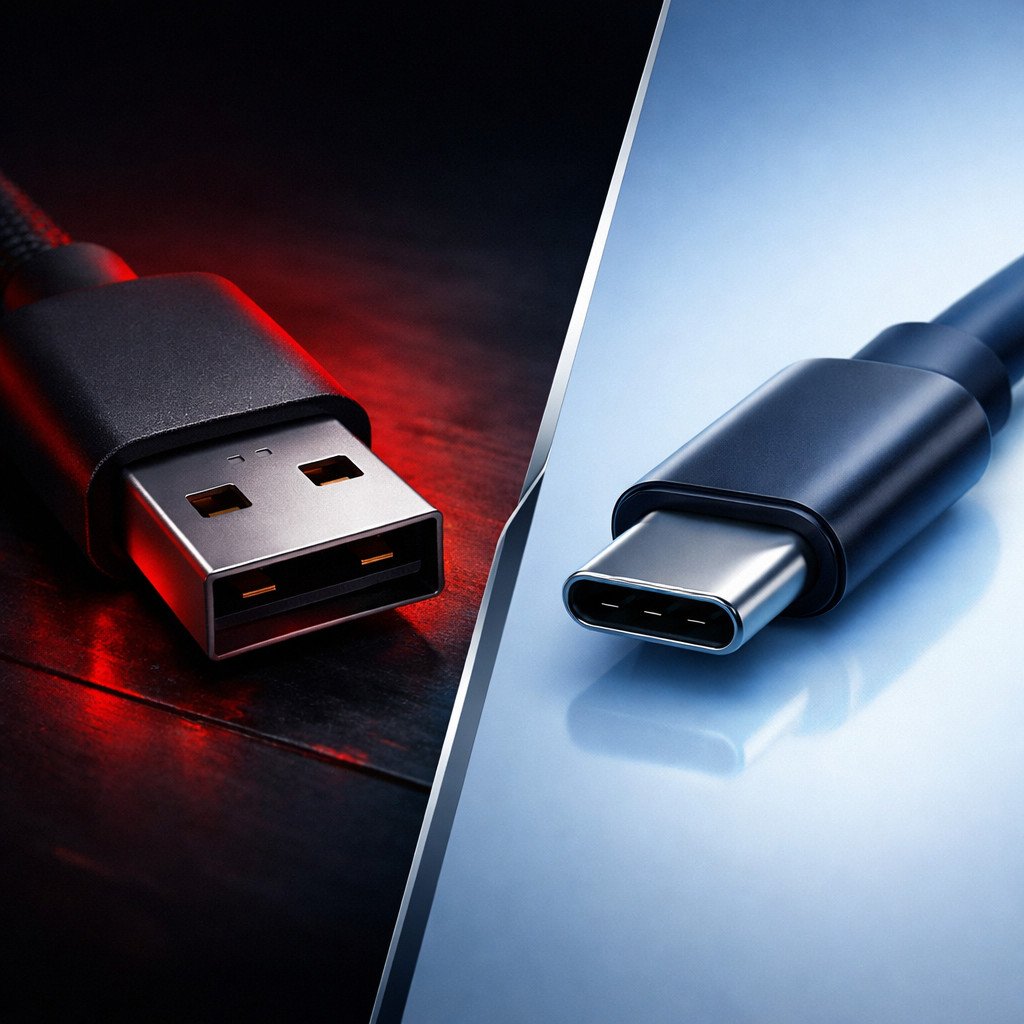
Left: Traditional USB-A only fits one way—a source of constant user frustration. Right: USB Type-C works in either orientation, eliminating the "three-try flip" phenomenon.
Business Impact: Lower Return Rates and Higher Satisfaction
While "easier to plug in" might seem like a minor convenience, it translates to measurable B2B benefits:
- Reduced support inquiries: Corporate IT departments report fewer "my cable doesn't work" tickets related to orientation issues
- Lower return rates: Consumer surveys consistently rank "connector orientation frustration" among top reasons for negative accessory reviews
- Improved durability: Users are less likely to force connectors at incorrect angles, reducing port damage on expensive devices
- Better accessibility: Users with visual impairments or limited dexterity benefit significantly from orientation-agnostic design
Durability Comparison: Type-C vs. Micro-USB
Beyond reversibility, the Type-C connector's mechanical design offers superior durability:
| Connector Type | Rated Insertion Cycles | Common Failure Mode | B2B Implication |
|---|---|---|---|
| Micro-USB | ~5,000 - 8,000 | Latch mechanism wear, pin bending | Higher replacement rate, more warranty claims |
| USB Type-C | 10,000+ (spec minimum) | Debris accumulation in port | Longer product lifespan, fewer returns |
| Lightning (Apple) | ~10,000 | Gold contact wear | Proprietary ecosystem, limited B2B opportunity |
For B2B buyers, the combination of reversibility and mechanical durability makes Type-C the clear choice for long-term inventory planning.
Advantage 2: High-Power Charging – From 15W to 240W PD
Perhaps the most transformative advantage of USB Type-C is its power delivery capability. Through the USB Power Delivery (USB-PD) protocol, Type-C cables can dynamically negotiate voltage and current levels to deliver precisely the power a device requires—up to levels that were unimaginable for USB just a few years ago.
USB-PD Power Level Evolution
| USB-PD Version | Maximum Power | Voltage/Current | Typical Applications | Year Introduced |
|---|---|---|---|---|
| USB-PD 1.0 | 100W (SPR) | 20V @ 5A | Laptops, tablets, fast-charging phones | 2012 (limited adoption) |
| USB-PD 2.0 / 3.0 | 100W (SPR) | 20V @ 5A | Ultrabooks, MacBook, flagship Android phones | 2014-2015 |
| USB-PD 3.1 | 240W (EPR) | 28V/36V/48V @ 5A | Gaming laptops, workstations, monitors | 2021 |
Comparison with Legacy USB Charging Standards
The power delivery gap between Type-C and legacy USB is staggering:
Legacy USB-A Charging
- USB 2.0 Standard: 2.5W (5V @ 0.5A)
- USB 3.0 Standard: 4.5W (5V @ 0.9A)
- USB-BC (Battery Charging): 7.5W (5V @ 1.5A)
- Proprietary "Fast Charge": 10-18W
- Limited to 5V typically
USB Type-C with PD
- Standard Power Range: 100W (20V @ 5A)
- Extended Power Range: 240W (48V @ 5A)
- PPS (Programmable Power Supply): Variable voltage for efficiency
- Up to 53x more power
The Critical Role of E-Marker Chips in High-Power Charging
To safely deliver more than 3A (60W at 20V), a Type-C cable must contain an E-Marker (Electronically Marked) chip inside the connector. This tiny IC communicates the cable's capabilities to the charger during the PD negotiation handshake:
- No E-Marker: Cable limited to 3A (60W maximum at 20V)
- 5A E-Marker: Cable certified for 5A (100W at 20V, or 240W at 48V with EPR)
- Thunderbolt E-Marker: Additional fields for 40Gbps data and video support
For B2B buyers, this creates a critical sourcing consideration: a cable marketed as "100W" must contain a properly programmed 5A E-Marker chip AND adequately thick power conductors (typically 21-22 AWG). Many low-cost cables claim 100W support but fail one or both requirements—a direct path to customer returns and potential safety issues.
Real-World Charging Performance Comparison
| Device | Legacy USB-A Charging | USB Type-C PD Charging | Time Saved (0-50%) |
|---|---|---|---|
| MacBook Pro 16" | Not supported (requires PD) | 96W, full charge ~2.5 hours | N/A – won't charge via USB-A |
| iPad Pro 12.9" | ~12W, 0-50% in ~90 min | 30W, 0-50% in ~35 min | ~55 minutes faster |
| Samsung Galaxy S24 Ultra | ~10W, 0-50% in ~60 min | 45W PPS, 0-50% in ~20 min | ~40 minutes faster |
| iPhone 16 Pro Max | ~12W (USB-A to C), ~45 min | 27W PD, 0-50% in ~30 min | ~15 minutes faster |
B2B Sourcing Implications: Power Delivery
When sourcing Type-C cables for charging applications, B2B buyers should verify:
- E-Marker presence: For any cable claiming 100W+ support, verify with a USB-C tester
- Power conductor gauge: 21-22 AWG for 5A cables; 24 AWG is insufficient
- USB-IF certification: Certified cables undergo rigorous power delivery compliance testing
- EPR support: For 240W applications, confirm EPR-specific E-Marker programming
Advantage 3: Blazing-Fast Data Transfer – From 480Mbps to 40Gbps
USB Type-C supports data transfer speeds spanning two orders of magnitude—from 480Mbps (USB 2.0) to 40,000Mbps (USB4/Thunderbolt 3). Understanding this speed spectrum is critical for B2B buyers to match cables to their customers' actual needs.
Complete Type-C Data Speed Hierarchy
| USB Specification | Marketing Name | Max Speed | Internal Pairs Required | Typical Cable Cost | Use Case |
|---|---|---|---|---|---|
| USB 2.0 | Hi-Speed USB | 480 Mbps | 0 (D+/D- only) | $ (Lowest) | Charging only, basic peripherals |
| USB 3.2 Gen 1 | SuperSpeed USB 5Gbps | 5 Gbps | 1 SuperSpeed pair | $$ | External HDDs, everyday file transfers |
| USB 3.2 Gen 2 | SuperSpeed USB 10Gbps | 10 Gbps | 2 SuperSpeed pairs | $$$ | External SSDs, 4K video editing |
| USB 3.2 Gen 2x2 | SuperSpeed USB 20Gbps | 20 Gbps | 2 pairs (dual-lane) | $$$ | High-performance external storage |
| USB4 Gen 2 | USB4 20Gbps | 20 Gbps | 2 coaxial pairs | $$$ | Future-proof general purpose |
| USB4 Gen 3 / TB3 | USB4 40Gbps / Thunderbolt 3 | 40 Gbps | 4 coaxial pairs | $$$$ (Highest) | External GPUs, 8K video, professional workflows |
Real-World Transfer Time Comparison
Transferring a 50GB 4K video project file:
USB 2.0 (480Mbps)
~14 minutes
Practical for small files only
USB 3.2 Gen 2 (10Gbps)
~40 seconds
Good for most users
USB4 / TB3 (40Gbps)
~10 seconds
Professional workflow ready
The Technical Foundation: Coaxial vs. Twisted Pair Construction
High-speed Type-C cables (10Gbps and above) use coaxial construction for data pairs, not simple twisted wires. Each coaxial assembly contains:
- Silver-plated copper center conductor: Lower resistance at high frequencies (skin effect)
- Foamed dielectric insulator: Maintains precise 90Ω characteristic impedance
- Individual aluminum foil shield: Prevents crosstalk between adjacent pairs
- Tinned copper drain wire: Connects shield to ground
This coaxial construction is significantly more expensive to manufacture than simple twisted pairs, which is why high-speed Type-C cables command higher prices. It's also why "10Gbps" cables from unreliable suppliers often fail to achieve rated speeds—they cut corners on coaxial construction.
Active vs. Passive Cables: Length and Speed Trade-offs
At high data rates, signal degradation over copper becomes significant:
- Passive cables: Copper only, no signal conditioning. Limited to ~0.8m at 40Gbps, ~1m at 10Gbps
- Active cables: Include Re-driver or Re-timer chips that regenerate signals. Available in 2m+ lengths at full 40Gbps
For B2B buyers sourcing longer cables for high-speed applications, active cables are essential—passive cables will either fail to connect or drop to lower speeds.
Critical B2B Sourcing Warning
The most common data-speed-related return for Type-C cables is customers discovering their "data cable" only supports USB 2.0 speeds. This happens when they connect an external SSD and experience 30-40 MB/s transfers instead of 1,000+ MB/s. The cable works—it charges, it transfers files—but the performance is orders of magnitude below expectations. For B2B buyers, clear labeling and accurate specifications are the only defense against these returns.
Advantage 4: Video Output – Single Cable for Charging, Data, and Display
The ability to carry DisplayPort video signals alongside power and data is arguably Type-C's most transformative advantage for productivity and workspace applications. Through DisplayPort Alt Mode, a single Type-C cable can simultaneously charge a laptop, drive one or more external monitors, and maintain USB data connectivity—all through one connection.
How DisplayPort Alt Mode Works
DisplayPort Alt Mode dynamically repurposes some of the Type-C connector's high-speed data lanes to carry DisplayPort video signals. When a DP Alt Mode-capable host connects to a DP Alt Mode-capable device (monitor or dock), the USB-PD negotiation determines that video is requested, and the lanes are switched from USB data mode to DisplayPort mode.
For this to function, the cable must contain:
- All SuperSpeed data pairs (at least 2 pairs for 4K@60Hz)
- SBU (Sideband Use) wires for DisplayPort AUX channel communication
- Proper CC line configuration advertising DP Alt Mode support
| Cable Specification | Maximum Display Support | Typical Workstation Configuration |
|---|---|---|
| USB 3.2 Gen 1 (5Gbps) | 4K @ 30Hz (uncompressed) | Basic single monitor, not recommended for productivity |
| USB 3.2 Gen 2 (10Gbps) | 4K @ 60Hz, or dual 4K @ 60Hz (with DSC) | Single high-quality 4K productivity monitor |
| Thunderbolt 3 (40Gbps) | 8K @ 60Hz, or dual 4K @ 60Hz, or 5K/6K @ 60Hz | Professional video editing, dual monitor setups |
| Thunderbolt 4 (40Gbps) | Same as TB3, plus dual 4K @ 60Hz minimum guarantee | Enterprise workstation standard |
DSC (Display Stream Compression) is a visually lossless compression technology that enables higher resolutions and refresh rates over limited bandwidth. Many modern laptops and monitors support DSC, which is why 10Gbps cables can sometimes drive dual 4K displays through compatible docks.
The "Single Cable Docking" Revolution
For corporate and home office environments, Type-C's video capability has transformed workspace design:
- Before Type-C: Laptop required separate power adapter, DisplayPort/HDMI cable for monitor, USB cable for docking station/peripherals—3+ cables minimum
- With Type-C: Single cable connects laptop to USB-C monitor or dock; monitor/dock provides power, video, and USB connectivity
This consolidation reduces desk clutter, simplifies hot-desking (one cable to connect/disconnect), and lowers IT support overhead. For B2B buyers supplying corporate clients, "single-cable docking" capability is a key selling proposition.
Common Video-Related Customer Complaints and Root Causes
| Complaint | Root Cause | Prevention for B2B Buyers |
|---|---|---|
| "Monitor not detected" | Cable lacks SuperSpeed data pairs (charge-only cable) | Source full-featured cables for video applications |
| "Screen flickers or goes black" | Poor shielding causing EMI; insufficient bandwidth | Verify dual-layer shielding and speed rating |
| "Only 30Hz refresh rate" | Cable only supports 5Gbps, not enough for 4K@60Hz | Source 10Gbps+ cables for 4K@60Hz use cases |
| "Dock works but monitor doesn't" | Cable missing SBU wires for DP AUX channel | Confirm full-featured specification with supplier |
Advantage 5: Bidirectional Power Flow – Device-to-Device Charging
USB Type-C supports bidirectional power delivery—power can flow in either direction between two connected Type-C devices. This capability, enabled by the USB-PD protocol's dynamic role-swapping feature, creates practical scenarios that were impossible or required specialized hardware with previous USB standards.
How Bidirectional Power Works
In traditional USB, power flow is fixed: a host (computer) supplies power to a peripheral (phone, drive). USB-PD introduces the concept of power role swap, where devices can dynamically negotiate which one supplies power and which one consumes it. The CC pins handle this negotiation independently of data communication.
Practical Bidirectional Charging Scenarios
Phone-to-Phone Charging
Connect two Android phones via Type-C cable. The phone with higher battery percentage can charge the depleted phone—ideal for emergency situations when no charger is available.
Phone-to-Accessory Charging
Smartphone can directly charge wireless earbuds, smartwatches, or portable batteries via Type-C. Eliminates need for separate charging cables for each accessory.
Laptop-to-Phone Charging
Laptop functions as a high-capacity power bank for mobile devices. Common travel scenario: charge phone from laptop overnight, single charger for both.
Monitor-to-Laptop Charging
USB-C monitors can deliver up to 100W to connected laptops. The monitor's power supply powers both the display and the laptop through a single cable.
B2B Applications and Product Opportunities
Bidirectional power creates unique B2B product opportunities:
- Travel accessory kits: Single Type-C cable handles all charging needs between laptop, phone, earbuds, and power bank
- Emergency power solutions: Cables marketed specifically for device-to-device emergency charging
- Corporate IT deployments: Standardized Type-C cables reduce need for multiple charger types in meeting rooms and hot-desking environments
Important Distinction
Bidirectional power capability is a feature of the USB-PD protocol and device implementation, not an inherent property of the cable. Any properly constructed Type-C cable with CC wire support will carry bidirectional power. However, both connected devices must support USB-PD and implement power role swap for bidirectional charging to function.
Advantage 6: Universal Device Compatibility – One Standard for All Devices
USB Type-C has achieved what no previous connector standard accomplished: near-universal adoption across device categories, manufacturers, and price points. This consolidation is unprecedented in consumer electronics history.
Device Ecosystem Coverage (2025-2026)
| Device Category | Type-C Adoption Status | Key Examples |
|---|---|---|
| Smartphones | Near 100% | iPhone 15/16, Samsung Galaxy, Google Pixel, Xiaomi, Oppo, OnePlus |
| Laptops | 100% premium segment | MacBook, Dell XPS, Lenovo ThinkPad, HP Spectre, Surface Laptop |
| Tablets | 100% flagship models | iPad Pro/Air, Samsung Galaxy Tab, Surface Pro, Lenovo Tab |
| Gaming Consoles | Partial adoption | Nintendo Switch, Steam Deck, ASUS ROG Ally, PlayStation Portal |
| Accessories | Dominant | External SSDs, docking stations, portable monitors, power banks, earbuds |
Regulatory Acceleration: The EU Common Charger Directive
The European Union's Common Charger Directive (Radio Equipment Directive 2022/2380) mandates USB-C as the common charging port for most portable electronics sold in the EU, effective December 2024 for most categories and April 2026 for laptops. This regulation has accelerated global Type-C adoption and cemented its position as the long-term standard.
For B2B buyers, regulatory mandates remove uncertainty. Type-C inventory purchased today will remain relevant and salable for years to come—a critical consideration for long-term sourcing strategies.
Backward Compatibility with Legacy USB
Type-C maintains backward compatibility with legacy USB standards through adapter cables and dongles:
- Type-C to USB-A adapters: Enable Type-C devices to connect to USB-A ports (keyboards, mice, flash drives)
- Type-C to HDMI/DisplayPort adapters: Enable video output to legacy displays
- Type-C to Ethernet adapters: Add wired networking to devices without Ethernet ports
This backward compatibility creates additional B2B product opportunities in the adapter and dongle category, which often carries higher margins than cables alone.
Advantage 7: Slim Profile and Future-Proof Design
Beyond functional advantages, the Type-C connector's physical design enables thinner devices and provides headroom for future performance improvements that legacy connectors cannot accommodate.
Physical Dimensions Comparison
| Connector | Width | Height | Cross-Sectional Area | Relative Size |
|---|---|---|---|---|
| USB Type-A | 12.0mm | 4.5mm | ~54mm² | 100% (baseline) |
| USB Type-B | 8.5mm | 7.8mm | ~66mm² | 122% larger |
| Micro-USB | 6.85mm | 1.8mm | ~12.3mm² | 23% of Type-A |
| USB Type-C | 8.4mm | 2.6mm | ~21.8mm² | 40% of Type-A |
| Lightning | 6.7mm | 1.5mm | ~10mm² | 18% of Type-A |
Type-C is approximately 60% smaller than USB-A while supporting dramatically more functionality. This slim profile has enabled ultra-thin laptop and tablet designs that simply cannot accommodate full-size USB-A ports.
Future-Proof Signaling Architecture
Type-C's 24-pin design includes dedicated high-speed lanes that can be repurposed for future protocols without changing the physical connector. The USB4 and Thunderbolt 4 specifications leverage this same physical interface, demonstrating Type-C's ability to evolve while maintaining backward compatibility.
For B2B buyers, this architectural headroom means Type-C inventory won't become obsolete when new speed standards emerge—the same cables that support today's 40Gbps can potentially support future 80Gbps or 120Gbps standards through the same physical interface.
USB Type-C vs. Legacy Connectors: Complete Comparison
| Feature | USB Type-C | USB-A | Micro-USB | Lightning |
|---|---|---|---|---|
| Reversible | ✓ Yes | ✗ No | ✗ No | ✓ Yes |
| Max Power Delivery | 240W (48V/5A) | 4.5W (5V/0.9A) | 7.5W (5V/1.5A) | 12W (5V/2.4A) |
| Max Data Speed | 40 Gbps | 10 Gbps (USB 3.2) | 480 Mbps | 480 Mbps |
| Video Output | ✓ 8K@60Hz | ✗ (requires adapter) | ✗ | ✗ (limited) |
| Bidirectional Power | ✓ Yes | ✗ No | ✗ No | ✗ No |
| Ecosystem | Universal (all new devices) | Legacy only | Legacy only | Apple only (phased out) |
| Insertion Cycles | 10,000+ | 1,500-5,000 | 5,000-8,000 | 10,000+ |
| B2B Recommendation | Primary focus | Declining inventory | Phase out | Limited opportunity |
B2B Sourcing Implications and ROI Analysis
Understanding Type-C's advantages is essential, but translating that understanding into profitable sourcing decisions requires quantifying the business impact.
Return Rate Reduction: The Hidden Cost of Legacy Connectors
Industry data consistently shows Type-C products generating lower return rates than equivalent products with legacy connectors:
Micro-USB Cables
8-12%
Average return rate on major e-commerce platforms
USB-A to C Cables
5-8%
Transitional products with compatibility confusion
USB-C to C Cables
2-4%
Lower returns due to better user experience
For a product selling 10,000 units annually at $14.99, reducing return rate from 8% to 3% saves approximately $7,500 in direct return costs alone—not counting the revenue impact of better reviews and organic ranking.
SKU Consolidation Economics
A typical electronics accessory distributor's cable inventory before Type-C consolidation:
- Micro-USB cables: 4 SKUs (lengths: 1m, 2m, 3m; braided/basic)
- USB-C to C cables: 3 SKUs (charging, 10Gbps data, Thunderbolt)
- Lightning cables: 3 SKUs (MFi certified, varying lengths)
- Proprietary laptop chargers: 5+ SKUs (Dell, HP, Lenovo, etc.)
- Total: 15+ SKUs to manage
With Type-C consolidation, the same customer needs can be served with:
- Basic Type-C charging cable (1m, 2m, 3m): 3 SKUs
- Full-featured Type-C 10Gbps (1m, 2m): 2 SKUs
- Thunderbolt 4 active (2m): 1 SKU
- Total: 6 SKUs—60% reduction
Fewer SKUs means lower inventory carrying costs, simplified procurement, reduced warehouse complexity, and better negotiating leverage with suppliers through higher volume per SKU.
Premium Pricing Opportunity
Type-C cables with advanced features command significantly higher margins than basic charging cables:
| Cable Type | Typical Wholesale Cost | Typical Retail Price | Gross Margin |
|---|---|---|---|
| Basic USB 2.0 Charge-Only (1m) | $0.80 - $1.50 | $6.99 - $9.99 | ~70-85% |
| USB 3.2 Gen 2 10Gbps (1m) | $2.50 - $4.00 | $14.99 - $19.99 | ~75-80% |
| Thunderbolt 4 40Gbps Active (2m) | $12.00 - $18.00 | $39.99 - $59.99 | ~65-75% |
While premium cables have lower percentage margins, their higher absolute dollar margin per unit ($20-30 vs. $5-8) makes them highly attractive for B2B sellers with established customer trust.
Summary: Why USB Type-C Advantages Matter for Your Sourcing Strategy
USB Type-C represents more than a new connector shape—it's a fundamental rethinking of what a single cable can accomplish. The seven core advantages we've examined—reversibility, high-power charging, blazing-fast data, integrated video, bidirectional power, universal compatibility, and future-proof design—combine to create a connectivity standard that serves the needs of virtually every modern electronic device.
For B2B buyers, these advantages translate to tangible business benefits:
- Lower return rates: Better user experience means fewer returns and better reviews
- SKU consolidation: One cable type serves multiple device categories
- Premium positioning: High-performance Type-C cables command higher margins
- Future-proof inventory: Type-C is the mandated standard for years to come
- Regulatory tailwinds: EU Common Charger Directive accelerates global adoption
However, not all Type-C cables deliver on these advantages equally. As we've detailed throughout this guide, factors like wire gauge, E-Marker chips, coaxial construction, shielding quality, and active vs. passive design dramatically affect real-world performance. Partnering with a supplier who understands these technical distinctions—and maintains consistent quality across production batches—is the foundation of successful B2B Type-C cable sourcing.
Ready to Source Premium USB Type-C Cables That Deliver on All Seven Advantages?
WJWSY specializes in OEM and wholesale USB Type-C cable manufacturing for B2B buyers worldwide. We provide detailed technical specifications, consistent batch-to-batch quality, flexible customization options, and transparent sourcing support. Whether you need basic charging cables, 10Gbps full-featured cables, or Thunderbolt 4 active cables with custom branding—we help you match the right product to your market's needs.
Explore Manufacturing Capabilities → Request Samples & Quote →
For official USB Type-C specifications and USB Power Delivery standards, visit the USB-IF official website.
For a detailed technical breakdown of USB-C cable construction and performance tiers, read our comprehensive USB-C to USB-C Cable Complete Guide.
For understanding Thunderbolt 3 cable quality and internal construction, see our Thunderbolt 3 Cable Teardown Report.