

How to Choose a Micro USB Cable: 9 Key Factors
How to Choose a Micro USB Cable: 9 Key Factors
Micro USB cables are no longer the default on new phones, but they have not disappeared. Budget handsets, power banks, dash cams, game controllers, and a long tail of accessories still ship with a Micro-B port, and the replacement cable for those devices still has to be chosen rather than grabbed at random. The nine factors below decide whether that cable charges at full rate, moves data without errors, and survives a year in a bag.
1. Connector Type
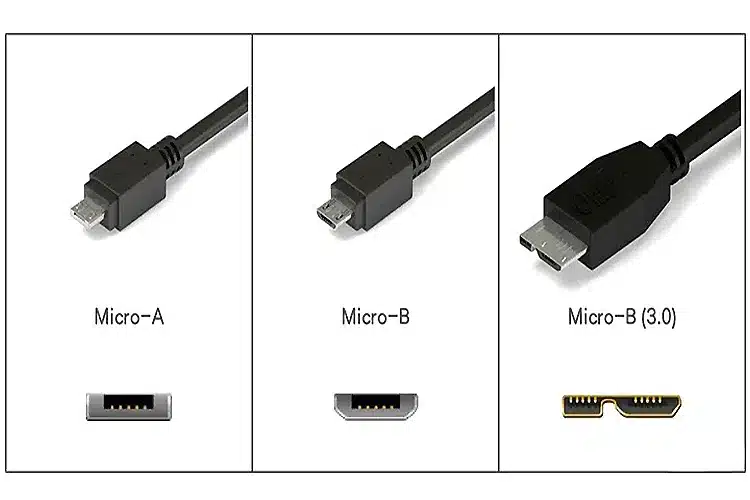
Micro-B is the common version: a small trapezoid plug that fits Android phones, cameras, power banks, and most budget electronics. Two variants are worth knowing. Micro-AB is a receptacle that accepts both Micro-A and Micro-B plugs, and it appears on devices that can act as either host or peripheral. Micro-B SuperSpeed is the wider 10-pin version used by the small number of USB 3.0 drives that kept the Micro form factor.
There is no Micro USB Type-A connector. USB-A is the rectangular host port on a computer, and the cable that mates with it is a standard A-to-Micro-B cable.
Before ordering, match the plug to the port: a Micro-B plug will not enter a USB-C receptacle, and a Micro-B SuperSpeed plug will not enter a standard Micro-B port.
2. Cable Length
Micro USB cables are sold from about 0.5 m (1.6 ft) to 3 m (10 ft). Length trades convenience against voltage drop. A 5V link has little headroom: at 2A, half an ohm of round-trip resistance costs about 1V, a fifth of the supply before the charger's own regulation is counted. A long, thin cable therefore charges more slowly even when nothing is faulty.
Short cables perform better for both charging and data. Long ones are useful for reaching a wall outlet behind furniture, but a 3 m cable at 2A will usually deliver less current than a 1 m cable of the same construction.
3. Charging Speed (Ampere Rating)
A plain Micro USB cable is built for 5V at 1A or 2A. The USB-IF rates the Micro-B connector at 1.8A, so 2A sits at the edge of the specification and 2.4A exceeds the connector rating even though chargers advertise it.
Quick Charge 2.0 and 3.0 work over Micro USB because they negotiate on the D+ and D− lines rather than through a USB-C channel. The charger raises the voltage to 9V or 12V, so the cable has to be rated for that voltage as well as for the current.
Match the cable to what the device asks for. A 3A cable does not make a 1A device charge faster, and a thin cable drops more voltage at 5V than at 9V, so the same device can charge more slowly on a plain 5V supply.
4. Data Transfer Speed
Most Micro USB cables are USB 2.0, with a signaling rate of 480 Mbps and real throughput around 35–40 MB/s once protocol overhead is counted. That is adequate for charging, firmware updates, and small file transfers.
USB 3.0 over Micro USB exists as Micro-B SuperSpeed at 5 Gbps, but it appears on very few products and needs the wider plug. If data volume matters, check the device specification before assuming the cable is the limit.
A charge-only cable carries power and ground conductors and no data pair. It will charge a phone but will not be recognized by a computer, and no driver will change that.
5. Durability
Three points fail first on a cheap cable: the jacket, the strain relief, and the plating.
Look for a jacket that stays flexible at low temperature and does not harden where it bends. Braided sleeves resist abrasion, though they add stiffness. The strain relief, the molded section where the cable meets the plug, should flex without creasing; that is where most Micro USB cables break, because the plug is small and the lever arm is long.
Gold plating on the contacts slows corrosion. It does not make a cable faster, and a thin flash of plating can wear through well before the connector's rated 10,000 mating cycles.
6. Power Delivery
USB Power Delivery is not available over Micro USB. PD uses the CC wire in a USB-C cable to negotiate voltage and current, and a Micro-B connector has no CC pin. The result is a ceiling of 5V at the connector's rated current, plus whatever a proprietary scheme such as Quick Charge can arrange on D+/D−.
That ceiling is why high-power devices moved to USB-C. A 45W phone or a 65W laptop cannot be charged over Micro USB at those rates, regardless of the cable or the charger.
For devices that stay on Micro USB, the practical target is a cable rated for the current the charger supplies, with conductors thick enough to keep the drop small at 5V.
7. Brand and Quality
Brand reputation is a proxy, not a specification. What matters is whether the seller publishes conductor gauge, current rating, and data rate. A cable that lists 22 AWG power conductors and a 2A rating can be checked; a cable that lists only "fast charging" cannot.
Customer reviews are useful for one thing above all: how the cable fails. Reports of a plug loosening, a jacket splitting at the strain relief, or charging slowing after a few months point to a construction problem rather than a one-off defect.
8. Certifications
USB-IF certification means a cable passed the compliance tests for its declared speed and current. Certified products carry a TID number that can be checked against the USB-IF integrator list.
Claims about protection circuitry deserve scrutiny. Overcurrent and overvoltage protection live in the charger and the device, not in a passive cable. When a listing mentions built-in protection, it usually refers to the charger sold with the cable.
9. Price
Price tracks materials more closely than it tracks performance guarantees. A cable at the bottom of the market saves on copper: thinner conductors, fewer strands, and plating that wears through. That shows up as slower charging at length and a shorter service life.
A mid-priced cable from a seller that publishes its specifications is the safer choice for daily use. The premium for a recognized brand buys consistency more than capability.
Final Notes
Nine factors, and the two easiest to check, length and connector type, are also the two a package usually states. The rest have to be verified before ordering, which is why a specification sheet is worth more than a marketing line.
Micro USB stays in production for accessories where the port costs less than a USB-C controller, and those programs still need cables that hold their rating across a full production run. The same rules carry over to any cable assembly: conductor gauge, connector rating, and strain relief decide the field failure rate more than the label does.
Cable assemblies for Micro USB, USB-C, and the adapters between them are built to the current and data rate the end device will actually draw, with plating and overmolding chosen for the number of mating cycles expected.