

Are USB-A and USB 3.0 the Same Thing?
Are USB-A and USB 3.0 the Same Thing?
They are not, and the confusion is easy to explain: the two terms describe different layers of the same system. USB-A is a shape. USB 3.0 is a speed. A cable can be both at once, which is why the names end up in the same sentence on a product page and read as if they were synonyms.
Sorting them out takes two definitions and one table, and it pays off at the point of purchase: most "why is this drive slow" complaints come from a port, a cable or a device that was not the generation the buyer assumed.
1. What Is USB-A?
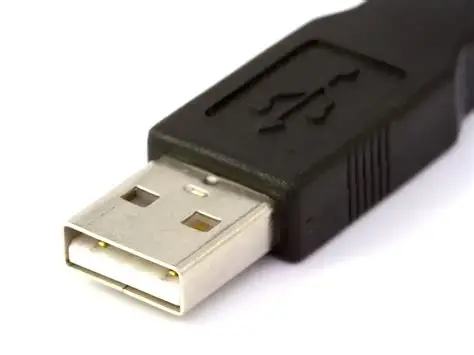
USB-A is the rectangular plug that has been on the host side of computers since the mid-1990s. Keyboards, mice, printers, flash drives and charger cables still use it, and it survives because the installed base is enormous rather than because it is good at anything in particular.
The important point is what the shape does not tell you. A USB-A port says nothing about data rate on its own: the same rectangle can be wired for USB 1.1 at 12 Mbps, USB 2.0 at 480 Mbps, or USB 3.x at 5 Gbps and beyond. The connector was designed before speed tiers existed, and it was never revised to encode them.
A related detail matters for cables. USB 2.0 Type-A has four contacts. A SuperSpeed Type-A plug carries nine, adding a transmit pair, a receive pair and a drain ground. The plug still fits either socket, but only the nine-pin version can carry the higher rate.
2. What Is USB 3.0?
USB 3.0 is a data standard published in 2008. It raised the bus from 480 Mbps to 5 Gbps, roughly a tenfold increase, and introduced the dual-bus arrangement that lets a SuperSpeed link carry USB 2.0 traffic alongside the fast lanes for backward compatibility.
The name has since changed twice without the speed changing. USB 3.0 became USB 3.1 Gen 1 in 2013, then USB 3.2 Gen 1 in 2017. All three labels describe the same 5 Gbps link, so a spec sheet that says "USB 3.1 Gen 1" is not faster than one that says "USB 3.0". Only "Gen 2" (10 Gbps) and "Gen 2x2" (20 Gbps) denote something quicker, and Gen 2x2 requires a USB-C connector.
USB 3.0 does not exist only as Type-A. The standard also runs over Type-B, Micro-B and Type-C, which is the source of the "USB-A that is also USB 3.0" phrasing: the plug shape and the speed are independent choices that a manufacturer combines.
3. What USB-A and USB 3.0 Have in Common
They belong to the same family and are designed to interoperate. A SuperSpeed Type-A plug fits any Type-A socket, including a USB 2.0 one, and will charge and transfer at the older rate. Nothing breaks and nothing warns you.
Full SuperSpeed throughput requires three things to agree: the host port, the cable and the device. Any one of them dropping to USB 2.0 pulls the whole link down to 480 Mbps. This is why a "USB 3.0 flash drive" can feel identical to an old one when it is plugged into a front-panel port wired for USB 2.0.
4. How They Differ
The distinction is one of category, not of quality:
- Connector versus standard. USB-A describes the plug. USB 3.0 describes the link.
- Speed. USB-A implies nothing about rate; USB 3.0 fixes it at 5 Gbps.
- Contacts. Four on a USB 2.0 Type-A plug, nine on a SuperSpeed one.
- Color coding. Blue inserts are a convention for SuperSpeed ports, not part of the specification.
| Feature | USB-A | USB 3.0 |
|---|---|---|
| Definition | Rectangular host-side plug | Data standard, 5 Gbps |
| Introduced | 1996, with USB 1.0 | 2008 |
| Maximum rate | 480 Mbps or 5 Gbps, depending on the port's standard; 10 Gbps on a Gen 2 port | 5 Gbps |
| Contacts | 4 (USB 2.0), 9 (SuperSpeed) | 9 on the Type-A version |
| Color | Black or gray is typical, and no color is mandated | Blue insert is usual, and no color is mandated |
| Power | 500mA at 5V (USB 2.0), 900mA at 5V (USB 3.0) | 900mA at 5V |
| Backward compatibility | Accepts USB 1.x, 2.0 and 3.x devices | Runs at the slower device's rate |
| Typical use | Keyboards, mice, printers, chargers | External drives, card readers, capture devices |
The color row deserves emphasis because it is the most misused shortcut. Blue usually means SuperSpeed, but plenty of black ports are USB 3.0 and some blue ports are USB 2.0 on budget hardware. The specification never assigned a color; the convention came from motherboard vendors.

5. Practical Applications
Charging and syncing. USB-A still has a massive installed base in the charging sector, but it is no longer the “unified standard port.”. Data rate is irrelevant here, so a USB 2.0 A-to-C cable loses nothing on an 18W USB-A charger. Where fast charging is involved, the protocol matters more than the connector: USB Power Delivery needs a C-to-C link, while Quick Charge and the Chinese proprietary standards run over Type-A.
Fast data transfer. A USB 3.0 port paired with a SuperSpeed cable is the minimum for backing up an external SSD, offloading camera cards or moving video files. On a USB 2.0 link, 100 GB takes close to an hour; over 5 Gbps the same transfer finishes in about four minutes.
Everyday peripherals. Keyboards, mice, printers and audio interfaces do not need the extra bandwidth, so a USB 2.0 port wastes nothing for them. Spending on SuperSpeed cabling for these devices buys no visible improvement.
6. Conclusion
USB-A and USB 3.0 are not the same thing, but they are routinely combined. USB-A is the connector; USB 3.0 is the 5 Gbps link, now called USB 3.2 Gen 1. To get the faster rate, confirm the port, the cable and the device all support it — and treat the color of the plastic as a hint rather than a specification.
7. Frequently Asked Questions
Will a USB 2.0 device work with a USB 3.0 port?
Yes. The port detects the older device and runs the link at 480 Mbps; the extra SuperSpeed contacts simply stay unused.
Is USB-A the same as USB 3.0?
No. USB-A is a connector shape that exists in USB 1.1, 2.0 and 3.x versions. USB 3.0 is a speed standard that can be delivered over several connector types.
Can I use a USB 3.0 cable in a USB-A port?
Yes. If the port is USB 2.0, the link still runs at 480 Mbps; the cable cannot add speed the port does not have.
How do I know if a port is USB 3.0?
A blue insert or an "SS" label usually indicates SuperSpeed, but neither is guaranteed. The reliable check is the specification sheet. On a PC, a USB 3.x controller in Device Manager confirms that the machine has SuperSpeed, but not which of its ports are wired for it.
What is the maximum speed of USB 3.0?
5 Gbps, about ten times USB 2.0's 480 Mbps, and roughly 500 MB/s once protocol overhead is removed. Higher rates belong to later generations: 10 Gbps for Gen 2, 20 Gbps for Gen 2x2 over USB-C.
The question buyers actually arrive with is rarely "which version" but "will this cable reach the speed I paid for". That depends on the pair count and the conductor gauge inside the assembly, which is why the specification belongs in the purchase order rather than in the color of the insert.
Whether the requirement is a legacy Type-A assembly for an installed base or a SuperSpeed cable for a new design, the same three details decide the result: contacts, pair count and shielding.