

DOES USB 3.0 WORK WITH USB 2.0— A GUIDE TO USB VERSIONS AND COMPATIBILITY
DOES USB 3.0 WORK WITH USB 2.0?— A GUIDE TO USB VERSIONS AND COMPATIBILITY
The short answer is yes—USB 3.0 does work with USB 2.0, but you won’t get the speeds of USB 3.0 technology.
In this guide, we talk you through:
- what makes a USB versionand what makes a USB type
- which new and old versions work together—known as backwards compatibility
- the most recent USB versions—USB 3.0, 3.1 and 3.2
USB VERSIONS AND TYPES—WHAT’S THE DIFFERENCE?
- Version—the technology standard itself rather than the shape of the plug or the USB port. The version affects the speed of data transfer and the charging speed only.
- Type—the shape of the USB connector or port. To read more about USB connector types and how to identify them, click here.
IS USB 3.0 BACKWARDS COMPATIBLE?
Yes, USB 3.0 backwards is compatible—meaning it’s designed to work with older USB versions including USB 2.0 and USB 1.1.
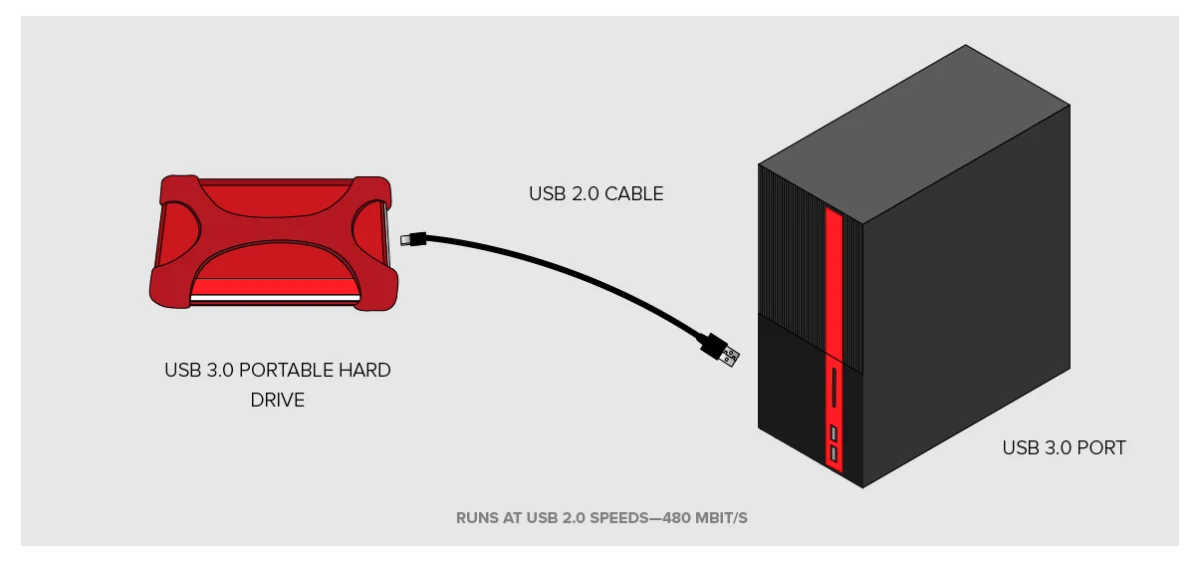
You can plug a USB 2.0 device into a USB 3.0 port and it will always work, but it will only run at the speed of the USB 2.0 technology.
So, if you plug a USB 3.0 flash drive into a USB 2.0 port, it would only run as quickly as the USB 2.0 port can transfer data and vice versa.

The same applies if you use a USB 2.0 cable with a USB 3.0 device.

WHY WILL IT RUN AT USB 2.0 SPEEDS?
A USB 2.0 cable has four wires inside it—a USB 3.0 cable has eight—and so will only transfer data at USB 2.0 speed. All components in the chain—the two devices and the cable—must be USB 3.0 to achieve that later version’s high speeds.
IS USB 3.1 BACKWARDS COMPATIBLE?
USB 3.1 Gen 2 is backwards compatible with ports and connectors that use either:
- USB 3.0/USB 3.1 Gen 1, or
- USB 2.0
Data transfer speeds will vary depending on the version (i.e. the lower the version, the slower the speed).
WHAT ARE USB 3.0, 3.1 AND 3.2?
USB 3.0
Launched in 2008, USB 3.0 improved significantly on its predecessor USB 2.0 by introducing SuperSpeed, a new data transfer rate that increased processing speeds more than tenfold, from 480 Mbit/s to 5 Gbit/s.
USB 3.1
By the time version 3.0 came along, USB was well established as the industry standard. In 2013 came USB 3.1, which doubled speeds to 10 Gbit/s—known as SuperSpeed+—when using USB Type A and USB-C connectors. (Read more on the different types of USB connector here.)
Here the confusion arose, as USB’s creators called its new version USB 3.1 Gen 2 (second generation), while giving USB 3.0 the new name of USB 3.1 Gen 1 (first generation).
Yet despite being built into some of the latest hardware (newer MacBooks, for example), USB 3.1 wasn’t very widely adopted. The smartphones and other devices many people use today tend to feature USB 3.0 or earlier versions.
USB 3.2
Released in September 2017, USB 3.2 allows compatible devices to take advantage of the SuperSpeed (5 Gbit/s) or SuperSpeed+ (10 Gbit/s) transfer rates. However, this latest version also introduced a new SuperSpeed+ mode (20 Gbit/s) that comes into play when using a USB-C connector and the very latest models of devices.
Because USB 3.2 is still in development, it’s unlikely to be widely adopted until the industry has made its hardware fully compatible.
WHAT ARE THE DIFFERENT VERSIONS OF USB?
As the USB standard has developed over time, it’s seen improvements in terms of speed and power, making it much quicker to run and charge USB devices and transfer data.
The oldest to newest versions of USB are shown below:
| VERSION | YEAR | DESCRIPTION | TRANSFER SPEED |
|---|---|---|---|
| USB 1.0 | 1996 | As the technology was still in its infancy, few USB devices were available to consumers. | 12 Mbit/s |
| USB 1.1 | 1998 | The first version to be used widely among the public. | 12 Mbit/s |
| USB 2.0 | 2000 | The standard USB. Many older computers feature USB 2.0 ports. | 480 Mbit/s |
| USB 3.0 | 2008 | The first USB to feature the new SuperSpeed capability. | 5 Gbit/s |
| USB 3.1 | 2013 | Introduced a data transfer speed equal to those achieved with an ethernet cable. | 10 Gbit/s |
| USB 3.2 | 2017 | The latest USB version designed to work with USB-C cables to deliver SuperSpeed+ transfer rates. | 20 Gbit/s |
USB 3.1 VS 3.0 VS USB TYPE-C—WHAT’S THE DIFFERENCE?
Anything with a version number (e.g. 2.0 or 3.0) is a standard—the technology that allows data to be transferred along a cable from one device to another.
Anything with a type (e.g. Type-A, Type-C) is referring to the connector and its shape.
However, where USB Type-C differs is that it’s been created purposely to take advantage of the new USB 3.1 standard. So rather than the version determining the speed and power at which data can be transferred, with USB-C it’s the connector itself.
To read more about USB connectors and how to identify them, click here.
WHAT ABOUT PHYSICAL USB COMPATIBILITY?
One of the most user-friendly aspects of USB is that its primary shape—the classic rectangle (Type-A) —is physically compatible with all earlier versions. This means USB Type-A plugs in versions 3.0, 3.1 or 3.2 will fit into old USB 2.0 ports and vice versa.
In most cases, plugs belonging to new versions of Type-B, mini and micro will not fit older ports.
The table below shows the physical compatibility between the various USB standards and connectors:
| PLUG AND VERSION | PORT | |||||||||||
|---|---|---|---|---|---|---|---|---|---|---|---|---|
| Type A 2.0 | Type A 3.0 | Type A 3.1 | Type A 3.2 | Type B 2.0 | Type B 3.0 | Type B 3.1 | Type B 3.2 | Type AB Micro 2.0 | Type B Micro 2.0 | Type B Micro 3.0/ 3.1/ 3.2 | Type C | |
| Type A 2.0 | Yes | Yes | Yes | Yes | No | No | No | No | No | No | No | No |
| Type A 3.0 | Yes | Yes | Yes | Yes | No | No | No | No | No | No | No | No |
| Type A 3.1 | Yes | Yes | Yes | Yes | No | No | No | No | No | No | No | No |
| Type A 3.2 | Yes | Yes | Yes | Yes | No | No | No | No | No | No | No | No |
| Type B 2.0 | No | No | No | No | Yes | No | No | No | No | No | No | No |
| Type B 3.0 | No | No | No | No | No | Yes | Yes | Yes | No | No | No | No |
| Type B 3.1 | No | No | No | No | No | Yes | Yes | Yes | No | No | No | No |
| Type B 3.2 | No | No | No | No | No | Yes | Yes | Yes | No | No | No | No |
| Type A Micro 2.0 | No | No | No | No | No | No | No | No | Yes | No | No | No |
| Type B Micro 2.0 | No | No | No | No | No | No | No | No | Yes | Yes | Yes | No |
| Type B Micro 3.0/3.1/3.2 | No | No | No | No | No | No | No | No | No | No | Yes | No |
| Type C | No | No | No | No | No | No | No | No | No | No | No | Yes |