

USB-C Charging: How to Pick the Right Charger
USB-C Charging: How to Pick the Right Charger
USB-C charging has become the default way to power a laptop, a phone, and a pair of earbuds from the same brick. The connector looks identical across products; what differs is the circuitry behind it, and that is where charging speed is decided.
This guide covers how the negotiation works, what to look for in a charger and a cable, and where most charging failures actually come from.
- 1. Key Takeaways
- 2. What is USB-C Charging?
- 3. How Does USB-C Power Delivery Work?
- 4. Choosing the Right USB-C Charger
- 5. The Different Types of USB-C Cables
- 6. Benefits of Using USB-C Chargers
- 7. Ensuring Optimal Performance with USB-C Accessories
- 8. Safety Tips for USB-C Charging
- 9. Common Issues with USB-C Charging
- 10. Multi-Port USB-C Chargers
- 11. The Future of USB-C Charging
- 12. Summary
- 13. Frequently Asked Questions

1. Key Takeaways
- USB-C chargers negotiate an output instead of delivering a fixed voltage, which is why one unit can serve a phone and a laptop.
- USB Power Delivery sets the ceiling: 100W in the standard power range, 240W once Extended Power Range is supported on both ends.
- A multi-port charger shares one fixed total, so the per-port number is always lower than the figure on the box.
2. What is USB-C Charging?
USB-C is a 24-pin connector with a symmetrical shape, which means it seats either way up. Power travels over the VBUS pins, but the amount is not fixed: the charger and the device agree on it over the configuration channel, a separate pair of pins reserved for this negotiation and for detecting the cable's orientation.
Backward compatibility is usually described as a matter of adapters, and that is only half true. A USB-A to USB-C cable will physically charge a modern phone, but it has no configuration channel, so the phone sees a default 5V source and USB Power Delivery never starts. The connector fits; the negotiation does not.
Beyond charging, three properties make the connector useful:
- It carries power and high-speed data in one connector, so a single cable can do both jobs.
- It handles power and data at the same time, which older connectors managed less cleanly.
- It is reversible, so there is no wrong way to plug it in.
3. How Does USB-C Power Delivery Work?
USB Power Delivery is the protocol that decides the number. The charger publishes a short list of voltage and current pairs, the device picks the one it can use, and both sides confirm before power flows. In the standard power range the ceiling is 100W; Extended Power Range adds 28V, 36V, and 48V steps, which is how 240W is reached.
PPS, the Programmable Power Supply extension, allows the voltage to move continuously between 3.3V and 21V in 20mV steps. Phones that expect a finely adjusted voltage charge faster on a supply that offers it, and fall back to a fixed step when it is missing.
Charging a laptop over USB-C works on the same principle, provided the charger and the cable are both rated for the wattage the laptop expects. A 65W laptop on a 45W charger does not fail; it charges more slowly, or discharges under heavy load.
4. Choosing the Right USB-C Charger
Charger shopping goes wrong when the wattage is chosen first and the device second. The starting point is the input rating printed on the original adapter, or the charging specification in the device manual. Anything at or above that number will work; anything below it charges more slowly, and may not keep up under load.
Certification is worth checking, not because a logo improves performance, but because it is third-party evidence that the published figures were tested. USB-IF maintains the compliance program for the standard, and a certified unit appears in its public product list.
Multi-port chargers deserve a closer look at the label. A 65W unit with two ports rarely gives 65W to each; the total is shared, and the split follows firmware rules that vary by product. The per-port figure in the specification is the one to read.
Older devices can join the same setup through an adapter or the right cable, but the ceiling stays with the older standard. A device built around USB-A charging will not gain Power Delivery because the brick on the other end supports it.
Read together, these four points answer most of the question: match the rating to the device, confirm the certification, check how the ports share, and accept the ceiling of anything older in the chain.
5. The Different Types of USB-C Cables
Not all USB-C cables are the same, and the differences are invisible from the outside. Two cables with identical connectors may be rated for 3A and 480 Mbps, or for 5A and 40 Gbps, and the price difference reflects the conductor count and the electronics inside the plug.
A single cable can carry power, data, and video at once, but only when it is built for all three. Video requires the high-speed lanes to be wired; charging above 3A requires an E-Marker chip that declares the cable's rating to the charger.
For the highest bandwidth, Thunderbolt 3 and 4 and USB4 cables reach 40 Gbps, while USB4 version 2 and Thunderbolt 5 reach 80 Gbps. Those cables also carry power, so a single rated cable can serve a dock, a display, and a laptop charger at the same time.

6. Benefits of Using USB-C Chargers
The first benefit is speed. A phone that supports Power Delivery can reach most of its peak charge rate on any compliant charger, without a proprietary brick.
The second is compatibility. One charger covers a phone, a tablet, a laptop, headphones, and a power bank, which reduces the number of adapters in a bag and the number of outlets a desk needs.
The third is headroom. The standard now reaches 240W, and the common laptop tier sits at 65W to 100W, so the same connector that charges a phone in an hour can run a workstation through a full working day.
7. Ensuring Optimal Performance with USB-C Accessories
Compatibility comes first. A charger and a device need at least one shared voltage and current pair, and the cable must be rated for whatever they agree on. When all three line up, the device draws its maximum; when one does not, the link settles at the highest safe level instead.
Product documentation is a better guide than brand recognition. A manufacturer that publishes conductor gauge, rated current, and supported data rate is giving a buyer something to verify; a listing that mentions only "fast charging" is not.
Specific features come last. A cable bought for video output needs the high-speed lanes, a cable bought for a 100W laptop needs 5A and an E-Marker, and a cable bought for file transfer needs a data rate that matches the drive at each end.
8. Safety Tips for USB-C Charging
Safety in USB-C charging is mostly about the current path, and a few points cover most of it:
- Overcharge protection lives in the charger and in the device, not in the cable, so a certified charger matters more than an expensive cable.
- The cable has to be rated for the current the charger can deliver, because a thin conductor carrying 5A heats up.
- Above 3A, an E-Marker is mandatory; a cable without one will cap the link at 60W no matter what the charger offers.
- Certification from a recognized body confirms that the insulation, the plug, and the electronics were tested to a published standard.
To keep a charger working as designed:
- Keep it out of direct sunlight.
- Do not leave it in a parked car, where the interior can exceed 60°C.
- Coil cables loosely rather than wrapping them tight, because repeated sharp bends right behind the plug are where conductors break.
Heat is the mechanism behind most of these rules. Sustained high temperature ages insulation and electrolyte, and the damage is cumulative rather than immediate.
Accessories from a manufacturer that publishes its specifications carry less risk than an unbranded equivalent with no ratings on the packaging, mainly because the numbers can be checked before purchase.
9. Common Issues with USB-C Charging and How to Solve Them
Many complaints about USB-C charging trace back to negotiation rather than to a broken part. The device and the charger fail to agree on a power level, and the link settles at 5V or refuses to charge at all.
Three steps cover most of these cases:
- Use a C-to-C cable. A USB-A to USB-C cable cannot carry the negotiation at all, and no charger setting will change that.
- Check the cable's rating against the device. A 3A cable caps the agreement at 60W, and a 5A cable without an E-Marker may be read as 3A.
- Update the firmware on the device, and on the charger if the maker provides updates. Negotiation bugs are usually fixed there rather than in hardware.
Once the cable and the ratings match, the remaining failures are usually port damage or debris in the connector, which a visual inspection often reveals.
10. Multi-Port USB-C Chargers: One Charger for All Devices
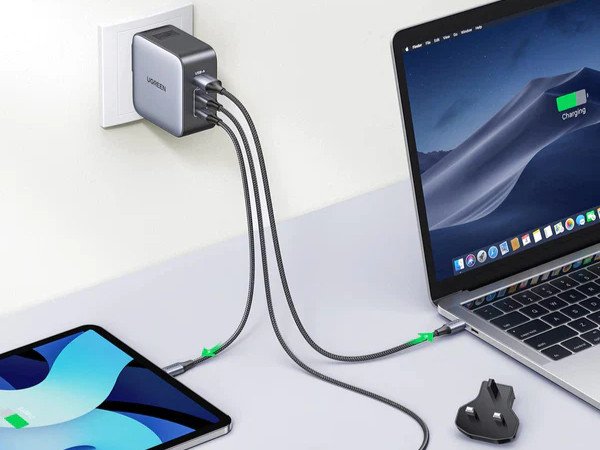
A multi-port charger replaces a row of bricks with one unit and one cable to the wall, which is the main reason people buy one.
The advantage is not faster charging for everything at once. A 100W three-port unit still delivers 100W in total, and connecting a second device reduces what the first one receives. What the extra ports buy is convenience and a predictable order of priority, not additional power.
Used with that in mind, a multi-port unit is a practical way to keep a desk organized: one cable to the laptop, one to the phone, one to the headphones, and a single point to unplug at the end of the day.
11. The Future of USB-C Charging
Regulation has accelerated what the market was already doing. The European Union's common charger rules applied to phones, tablets, cameras, and most small electronics from 28 December 2024, with laptops following from 28 April 2026.
Hubs and docks are extending the same port in a different direction. A single USB-C connection can now carry video to two displays, Ethernet, audio, and power, and some monitors support daisy chaining so that one cable serves a pair of screens.
For buyers, the effect is a smaller set of cables that works in more places, since the same charger that runs on 220V in one country runs on 110V in another with a plug adapter rather than a voltage converter.
12. Summary
USB-C charging is a negotiated standard rather than a fixed output, which is why the wattage on a box says less than the voltage and current pairs behind it.
The practical rules are short: match the charger to the device's input rating, match the cable to the current and data rate, and check the total rather than the per-port claim on a multi-port unit.
Standardization is still moving, but the parts that decide whether a setup works have not changed: a compliant charger, a cable rated for the load, and a device that supports the protocol being offered.
13. Frequently Asked Questions
What is USB-C Power Delivery (PD)?
USB-C Power Delivery is the negotiation protocol that lets a charger and a device agree on voltage and current. It reaches 100W in the standard power range and 240W with Extended Power Range.
How do I choose the right USB-C charger for my device?
Start with the input rating on the device's original adapter. Phones and tablets commonly sit between 20W and 45W, laptops between 45W and 140W, and a charger at or above the rating will deliver full speed.
Are all USB-C cables the same?
No. Connectors are identical, but cables differ in current rating, data rate, and whether they carry video. A 3A cable caps charging at 60W, and a 480 Mbps cable is a data bottleneck on a fast drive.
What are the benefits of multi-port USB-C chargers?
They consolidate several adapters into one unit and one wall connection. The total output is shared, so the benefit is convenience and fewer cables rather than more power.
How can I ensure the safety of my USB-C charging setup?
Use a certified charger, a cable rated for the current it will carry, and an E-Marker above 3A. Keep the charger out of hot cars and direct sun, and inspect the connector if charging becomes intermittent.
Purchasing a charger for a mixed set of devices comes down to two figures that are usually printed on the product page: the highest voltage and current pair the unit offers, and the total it can sustain once more than one port is in use.
A cable that matches those figures completes the setup. A 100W charger paired with a 3A cable will run at 60W, and that mismatch is easy to miss on a specification sheet.