

What Is USB 2.0? Speed, Features & Common Uses
What Is USB 2.0? Speed, Features & Common Uses
USB 2.0 is one of the most widely adopted USB standards for connecting computers, peripherals, and electronic devices. Introduced in 2000, it significantly improved data transfer performance over earlier USB versions, supporting a maximum signaling rate of 480 Mbps.
Although newer standards such as USB 3.2 and USB4 offer much higher speeds, USB 2.0 remains relevant in many everyday applications. Keyboards, mice, printers, scanners, cameras, and various charging accessories continue to use USB 2.0 connections.
Its relatively simple implementation, broad compatibility, and cost-effective cable design make it a practical choice for products that do not require high-speed data transmission.
So, what exactly is USB 2.0? How fast is it, which connectors does it use, and is it still worth using today?
Let's explore its main features, data transfer capabilities, connector types, and common applications.
1. Primary Devices Utilizing USB 2.0
USB 2.0 was designed to connect computers with a wide range of peripheral devices. Its compatibility and sufficient data bandwidth make it suitable for products that do not require extremely high transfer speeds.
Common devices using USB 2.0 include:
- Keyboards and mice: Standard input devices that require relatively little data bandwidth.
- Printers and scanners: Used for transferring documents, images, and scanning data.
- USB flash drives: Suitable for storing and transferring everyday files.
- Digital cameras: Used for connecting cameras to computers and transferring photographs.
- External storage devices: Some external hard drives and storage accessories use USB 2.0 connections.
- Network adapters: Certain basic USB network adapters use USB 2.0 interfaces.
- Game controllers: Many wired controllers use USB 2.0 for device communication.
- Mobile devices: Older smartphones and various accessories use USB 2.0 for charging and data synchronization.
USB 2.0 is particularly useful for devices that transfer relatively small amounts of data or operate through continuous low-bandwidth communication.
For example, a keyboard does not need the same data bandwidth as an external SSD. Using a more advanced USB standard would not necessarily provide a meaningful benefit for this type of product.
2. Attributes That Define USB 2.0
USB 2.0 introduced several improvements that helped establish it as a widely adopted connection standard.
Its main advantages include data transfer improvements, backward compatibility, plug-and-play operation, and relatively straightforward implementation.
2.1 High-Speed Data Transfer
USB 2.0 supports a maximum signaling rate of 480 Mbps, known as High-Speed USB.
This was a significant improvement over USB 1.1, which supported a maximum Full-Speed rate of 12 Mbps.
The higher bandwidth made USB 2.0 suitable for a broader range of peripherals, including digital cameras, external storage devices, and other accessories.
2.2 Backward Compatibility
USB 2.0 maintains compatibility with USB 1.1 devices.
This means older USB peripherals can continue to operate when connected to compatible USB 2.0 ports.
However, the actual connection speed depends on the slowest supported USB version in the connection.
For example, connecting a USB 1.1 device to a USB 2.0 port does not upgrade the device to 480 Mbps. It continues operating at its supported speed.
2.3 Plug-and-Play Functionality
USB 2.0 supports plug-and-play operation, allowing compatible peripherals to be connected and recognized without manually configuring the interface in typical operating environments.
Many USB devices can also be connected or disconnected while the computer is running.
This makes USB 2.0 convenient for everyday peripherals such as keyboards, mice, printers, and external storage devices.
2.4 Power Delivery for Peripheral Devices
USB 2.0 can provide power to connected peripherals through its power conductors.
Under the standard USB 2.0 downstream-port specification, a configured high-power peripheral can draw up to 500mA at 5V, equivalent to 2.5W. Before configuration, the available current is more limited.
This 500mA figure describes the standard USB 2.0 port specification, not the maximum current capacity of every USB 2.0 cable. Actual charging capability depends on the host port, charging implementation, cable construction, and connected device.
2.5 Cost-Effective Implementation
USB 2.0 uses a relatively simple data interface compared with higher-speed USB standards.
For products that do not require high-speed data transfer, USB 2.0 can offer a practical balance between performance, design complexity, and manufacturing cost.
This is one reason it continues to appear in many electronic accessories and embedded devices.
3. Data Transfer Rate of USB 2.0
Data transfer speed is one of the defining characteristics of USB 2.0.
The standard introduced High-Speed operation at 480 Mbps while maintaining compatibility with the Low-Speed and Full-Speed modes used by earlier USB devices.
3.1 USB 2.0 Data Transfer Speeds
USB 2.0 supports three signaling rates:
| Transfer Mode | Signaling Rate | Common Applications |
|---|---|---|
| Low-Speed | 1.5 Mbps | Basic keyboards and mice |
| Full-Speed | 12 Mbps | Standard peripherals and control devices |
| High-Speed | 480 Mbps | Flash drives, cameras, and compatible storage devices |
The 480 Mbps figure represents the theoretical signaling rate, not the guaranteed speed of actual file transfers.
In practical use, data throughput is lower because of protocol overhead, device limitations, file characteristics, and other system conditions.
3.2 USB 2.0 vs. USB 1.1 and USB 3.0
| USB-standaard | Maximum Signaling Rate | Common Name |
|---|---|---|
| USB 1.1 | 12 Mbps | Full-Speed |
| USB 2.0 | 480 Mbps | High-Speed |
| USB 3.0 | 5 Gbps | SuperSpeed |
USB 2.0 offers substantially more bandwidth than USB 1.1, making it suitable for many applications that require more than basic peripheral communication.
USB 3.0, on the other hand, provides up to 5 Gbps, making it more suitable for transferring large files and connecting high-performance storage devices.
3.3 What Does 480 Mbps Mean in Practice?
480 Mbps is equivalent to a theoretical signaling rate of 60 MB/s when converted using eight bits per byte.
However, this does not mean a USB 2.0 flash drive will consistently transfer files at 60 MB/s.
Actual speeds depend on the USB controller, storage performance, protocol overhead, and the connected devices.
For everyday peripherals, the available bandwidth is often sufficient. For large media files and demanding storage applications, a faster USB standard may be more appropriate.
4. Common USB 2.0 Connectors

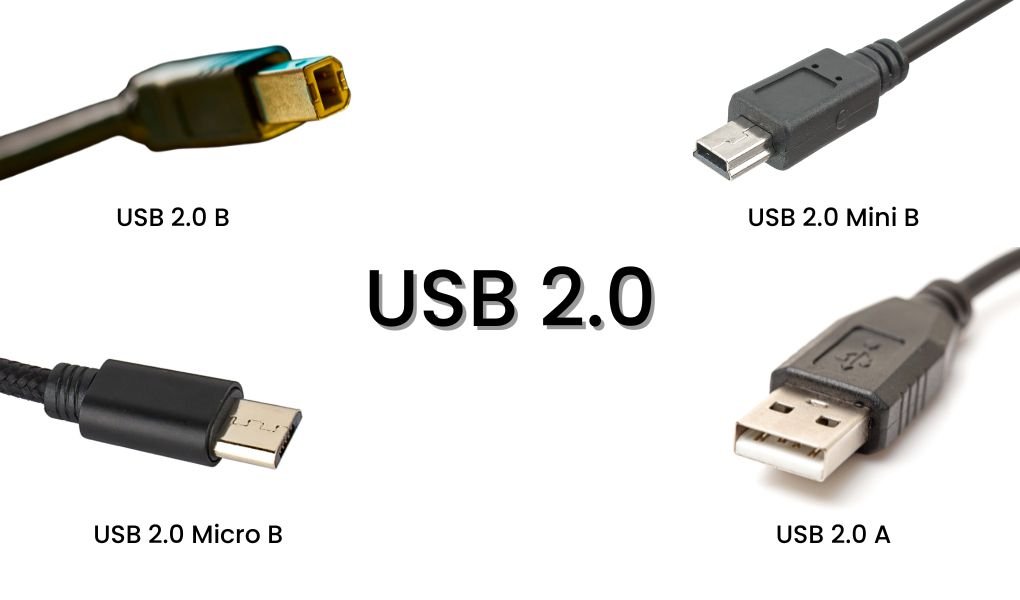
USB 2.0 supports several connector types designed for different devices and applications.
Although the underlying data standard remains the same, connector shapes and physical configurations vary depending on the equipment.
4.1 USB 2.0 Type-A
USB Type-A is the familiar rectangular connector commonly found on computers, wall chargers, hubs, and other electronic equipment.
It is frequently used on the host side of USB cables to connect computers with peripheral devices.
Typical applications include keyboards, mice, flash drives, and USB-A to Micro USB charging cables.
4.2 USB 2.0 Type-B
USB Type-B features a more square-shaped design with beveled upper corners.
It is commonly found on printers, scanners, and certain other larger peripherals.
A USB-A to USB-B cable is a typical example, connecting a computer to a compatible printer or other equipment.
4.3 USB 2.0 Mini-B
Mini-USB Type-B is a smaller connector that was widely used in older portable electronic devices.
It can be found on older digital cameras, GPS devices, and selected accessories.
Although it has largely been replaced by Micro USB and USB-C in newer products, Mini USB remains relevant when manufacturing replacement cables or supporting legacy equipment.
4.4 USB 2.0 Micro-B
Micro USB Type-B was widely adopted in smartphones, cameras, portable accessories, and other compact electronic devices.
Its smaller physical size made it suitable for thinner products.
Although USB-C has replaced Micro USB in many modern devices, Micro USB cables are still used for older smartphones, power banks, embedded equipment, and various accessories.
4.5 USB Type-C with USB 2.0 Data Support
USB Type-C is a reversible connector introduced in 2014 and can support USB 2.0 data communication.
A USB-C cable designed for USB 2.0 supports data transfer at up to 480 Mbps. However, the USB-C connector itself does not determine the cable's data speed.
Some USB-C cables support only USB 2.0 data, while others support USB 3.x or USB4.
USB-C can also support USB Power Delivery and alternative modes when the cable and connected devices are designed for those functions. A USB 2.0 data connection alone does not guarantee video output, high-speed data transfer, or other advanced USB-C features.
5. Do Devices Still Utilize USB 2.0?
Yes. Despite the development of USB 3.2 and USB4, USB 2.0 continues to be used in many electronic products.
Not every device needs extremely high data-transfer speeds. For products such as keyboards, mice, basic printers, and various embedded peripherals, USB 2.0 can provide sufficient performance.
There are several reasons manufacturers continue to use it.
5.1 Sufficient Performance for Everyday Applications
Many peripherals transfer relatively small amounts of data.
A keyboard or mouse, for example, does not require the bandwidth of a high-speed external SSD.
USB 2.0 provides enough performance for these applications without introducing unnecessary interface complexity.
5.2 Cost-Effective Product Design
Products that do not require high-speed data transfer can often use simpler USB 2.0 implementations.
This can help manufacturers manage component costs and product design requirements.
5.3 Broad Device Compatibility
USB 2.0 has an extensive installed base of compatible devices, cables, and accessories.
This makes it useful for replacement cables, legacy equipment, and products designed to connect with existing USB infrastructure.
5.4 Continued Use in Embedded Equipment
Many embedded systems and electronic control devices do not require high-speed data communication.
USB 2.0 remains a practical option for connecting control boards, peripherals, and other equipment where bandwidth requirements are relatively modest.
The choice between USB 2.0 and newer standards should therefore depend on the application's actual requirements rather than simply selecting the newest available specification.
6. Choosing USB 2.0 Cables for Bulk Orders
For brands, wholesalers, and electronic product manufacturers, selecting a suitable USB 2.0 cable involves more than choosing the connector type.
Cable construction, length, electrical performance, connector quality, and application requirements all influence the final product.
6.1 Important Specifications to Consider
| Specificatie | Wat je moet controleren |
|---|---|
| Type connector | USB-A, USB-B, Mini USB, Micro USB, or USB-C |
| Gegevensoverdracht | USB 2.0 High-Speed, up to 480 Mbps |
| Kabellengte | Match the cable to the device and applicable USB specifications |
| Conductor Size | Select suitable wire gauge for the intended current |
| Cable Material | Consider PVC, TPE, braided, or other suitable constructions |
| Connector Quality | Check contact quality, molding, and mechanical durability |
| Electrical Performance | Evaluate continuity, resistance, and voltage drop |
| Duurzaamheid | Consider bending, pulling, and connector insertion tests |
6.2 Why Cable Design Matters
Even when two cables support USB 2.0, their construction quality can differ significantly.
For example, conductor size and cable length affect electrical resistance and voltage drop. Connector molding and strain relief also influence the cable's ability to withstand repeated use.
For products that require reliable data communication, cable assembly and signal integrity must also meet the applicable USB 2.0 requirements.
Before mass production, manufacturers should define the connector configuration, cable length, current requirements, and intended application.
6.3 OEM and ODM USB Cable Manufacturing
For customized USB 2.0 cable projects, buyers may require different connector combinations, lengths, cable materials, and packaging configurations.
Working with an experienced cable manufacturer helps ensure that the product design matches its intended electrical and mechanical requirements.
We support USB cable OEM/ODM projects, including connector selection, cable construction, customized lengths, material options, and production requirements.
7. Conclusie
USB 2.0 remains an important USB standard despite the introduction of newer high-speed interfaces.
With a maximum signaling rate of 480 Mbps, backward compatibility, and broad support across electronic peripherals, it continues to serve many everyday applications.
Its connector options include USB-A, USB-B, Mini USB, Micro USB, and USB-C, allowing manufacturers to develop cables for different generations of equipment.
Although USB 2.0 is not designed for demanding high-speed storage applications, it remains a practical and cost-effective solution for peripherals, embedded devices, and standard data connections.
Choosing the right USB 2.0 cable means matching its connector, construction, length, and electrical specifications to the intended application.