

USB C to C Cable Types: All Types, Specs and How to Choose
USB C to C Cable Types: All Types, Specs and How to Choose
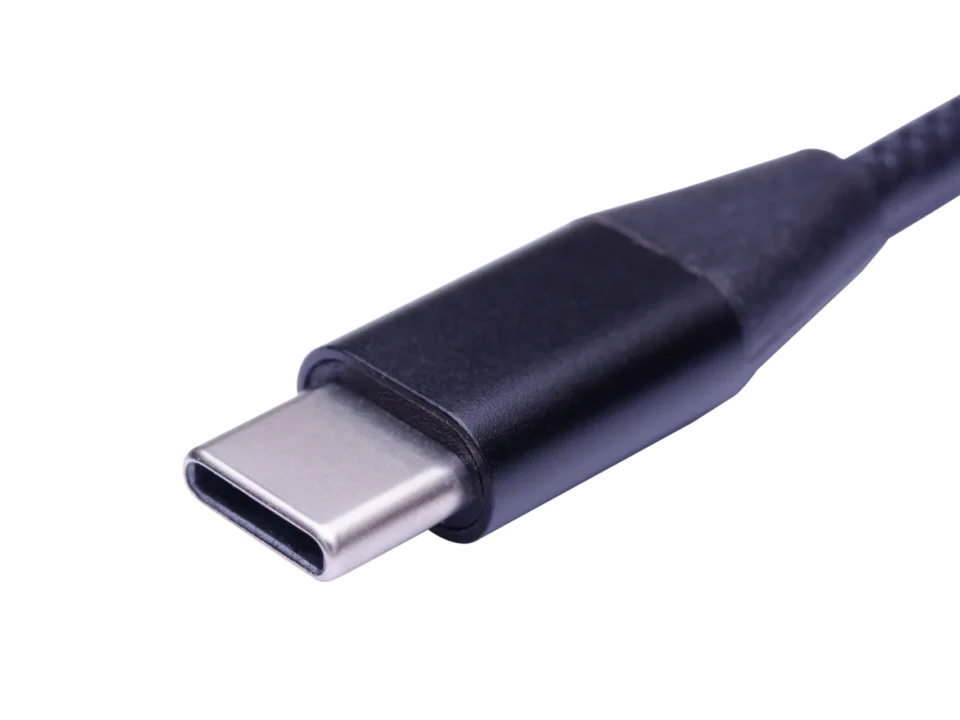
The plug on a 480 Mbps charging cable and the plug on a 40 Gbps USB4 cable are the same piece of metal. That is the entire source of the confusion around USB C to C cable types. USB-C, or USB Type-C, standardises the connector and the port. It says nothing about the protocol inside, the number of cores, or how much power the cable can safely carry. Buyers discover the difference after the purchase, usually in one of three ways: a charger that will not go past 60W, an external SSD that transfers at USB 2.0 speed, or a monitor that never lights up on a USB-C connection. This article covers the seven cable types that matter in that range — from a three-core power cable to a certified Thunderbolt 4 cable — with the wiring, specifications and use cases of each, plus a checklist for specifying them correctly.
- 1. What decides what a USB-C to USB-C cable can do
- 2. Power-only USB-C to USB-C cable
- 3. Standard USB-C to USB-C cable (USB 2.0)
- 4. USB 3.0 USB-C to USB-C cable
- 5. USB 3.1 Type-C to Type-C full-featured cable
- 6. USB 3.2 USB-C to USB-C cable
- 7. USB4 USB-C to USB-C cable
- 8. Thunderbolt USB-C to USB-C cable
- 9. Power: 100W, 240W and the E-Mark rule
- 10. USB-C to USB-C cable types compared
- 11. Specifying a USB-C to USB-C cable
- 12. FAQ

1. What decides what a USB-C to USB-C cable can do
Before the individual types, three variables explain almost every difference between them.
Core count and layout. A power cable needs three conductors. A full-featured cable needs sixteen, because high-speed data runs on shielded differential pairs rather than a single wire.
Supported USB generation and alternate modes. The cores have to be routed for the generation they serve. USB 2.0 uses one pair; USB 3.x adds SuperSpeed lanes; USB4 uses all four lanes with USB-C's 24-pin arrangement.
Power rating and the E-Mark chip. The connector is rated for 5A, but above 3A the cable must carry an electronically marked chip that declares its capability to the charger. This is a cable requirement, not a charger one.
Everything below is a different combination of those three.
2. Power-only USB-C to USB-C cable
This is the simplest type, and it exists for a specific job: powering adapters, lamps, desk fans, toys, measuring instruments and other peripherals that have no data path at all.
It is a common misconception that a power-only cable contains just VBUS and Ground. In practice it carries three cores, and the third one is the one cheap builds tend to leave out.
Il CC (configuration channel) wire is how a charger and a device negotiate. It carries the protocol conversation that decides voltage, current and who is supplying power. Remove the CC line and the attach handshake cannot complete: a compliant PD adapter will not enable VBUS output, and power negotiation never starts. Adapters that do not follow the PD specification may still present 5V, but the link no longer behaves as a USB-C PD connection should.
The three cores
- VBUS carries current from the adapter to the device.
- Ground provides the circuit reference and a safe return path.
- CC negotiates voltage, current and power direction with the charger.
3. Standard USB-C to USB-C cable (USB 2.0)
This is the cable shipped in the box with nearly every phone, tablet and accessory, and it remains by far the highest-volume type C USB cable produced. It charges at up to 20V/3A — 60W — and moves data at 480 Mbps.
3.1 What it covers
- Charging: 60W is enough for phones, tablets, accessories and most thin-and-light laptops. The two fast-charging protocols most often specified for this grade are Qualcomm Quick Charge (QC) and USB Power Delivery (PD), and the cable has to be wired for whichever one the charger uses.
- Data: 480 Mbps under USB 2.0 handles documents, photos, music and firmware updates. It does not handle large backups or video work.
3.2 Why it cannot go faster
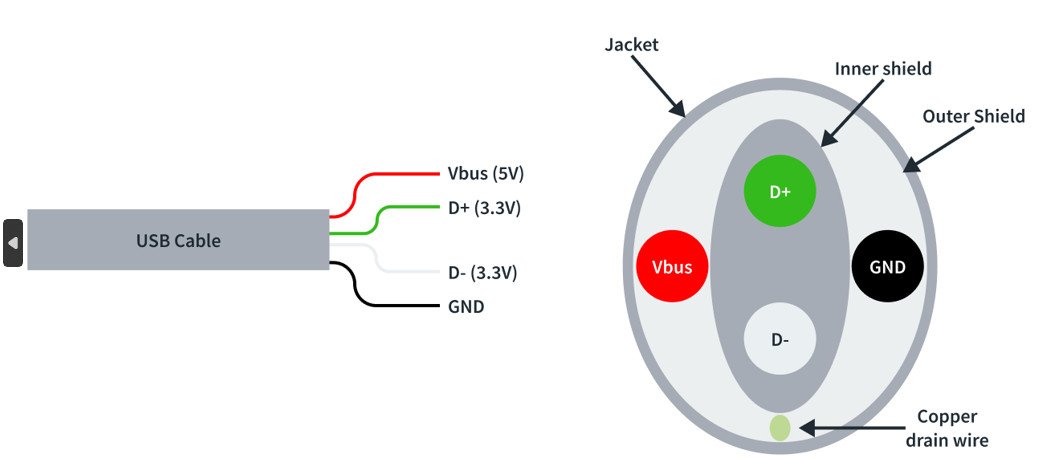
Five cores set the ceiling: VBUS, Ground, CC, and a single differential pair, D+ and D−. USB 2.0 needs only that one pair, so there is no physical lane for SuperSpeed traffic. The limitation is in the copper, not in the firmware.
3.3 The five cores
- VBUS — main power conductor from the source to the device.
- Ground — electrical reference, keeping current flow stable and the circuit safe.
- CC — negotiates power delivery and confirms compatibility.
- D+ (USB 2.0 differential positive) — carries the positive half of the USB 2.0 data signal.
- D− (USB 2.0 differential negative) — carries the negative half and works with D+ to complete the data exchange.
The higher-speed types below keep the USB 2.0 pair and add SuperSpeed lanes beside it. That addition is what raises the speed and, in most cases, the cost.
4. USB 3.0 USB-C to USB-C cable
USB 3.0 added SuperSpeed transmit and receive pairs, taking throughput to 5 Gbps while keeping the USB 2.0 pair for backward compatibility. In the current market it occupies a narrow band: USB 2.0 is still the baseline for low-cost accessories, and USB 3.1 Gen 2 and above have taken over the performance end.
Where this generation still sells is in external hard drives and older SSD enclosures, whose controllers were designed around a 5 Gbps link. The demand is genuine but specialised, and it is the main reason a USB 3.0 build still appears on purchase orders.
For buyers, the practical rule is simple: USB 3.0 means 5 Gbps, and it is now also sold under the USB 3.2 Gen 1 label — the same cable, renamed. Do not treat a version number as a synonym for "fast"; check the rated rate on the datasheet, because the label alone will not tell you.
5. USB 3.1 Type-C to Type-C full-featured cable
"Full-featured" is the dividing line in this family. It is the build that carries high-speed data, video and power over one 16-core construction, and it is usually what a buyer means by a full-featured USB-C cable — one that "does everything".
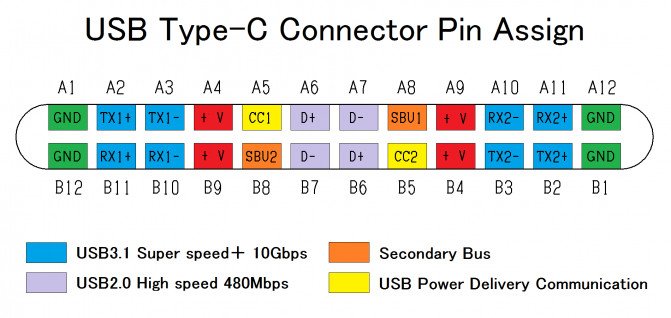
The connector pinout below is shared by full-featured and USB4 cables: 12 pins on the A row and 12 on the B row, mirrored so the plug works in either orientation.
| Pin | A1 | A2 | A3 | A4 | A5 | A6 | A7 | A8 | A9 | A10 | A11 | A12 |
|---|---|---|---|---|---|---|---|---|---|---|---|---|
| Signal | GND | SSTXp1 | SSTXn1 | VBUS | CC1 | DP1 | DN1 | SBU1 | VBUS | SSTXn2 | SSTXp2 | GND |
| Pin | B1 | B2 | B3 | B4 | B5 | B6 | B7 | B8 | B9 | B10 | B11 | B12 |
| Signal | GND | SSTXp2 | SSTXn2 | VBUS | CC2 | DP2 | DN2 | SBU2 | VBUS | SSTXn1 | SSTXp1 | GND |
Those sixteen cores break down into four SuperSpeed pairs, one USB 2.0 pair, VBUS and Ground, both CC lines, and the sideband (SBU) lines. With them, a USB 3.1 Gen 2 cable reaches 10 Gbps — roughly twenty times the throughput of a USB 2.0 cable — and carries 4K video and audio while staying backward compatible with USB 2.0 devices. A 3 GB video file moves in seconds rather than minutes.
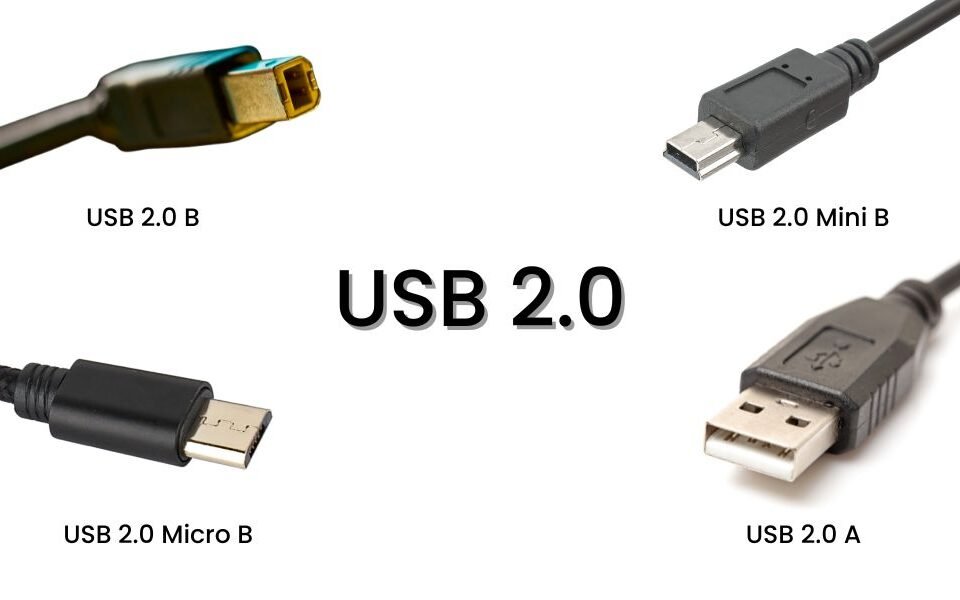
Production is where this type gets hard. There is no Type-A, Type-B, Micro or Mini version of the connector to fall back on, and the 24 contact points sit on a very tight PCB footprint. Termination has to run on automated welding equipment with tight process control, and not every factory holds that tolerance at volume. It is the main reason full-featured cables differ so widely in field failure rates despite looking identical on the shelf.
6. USB 3.2 USB-C to USB-C cable
USB 3.2 raised the lane count instead of the clock: Gen 2×2 runs two 10 Gbps lanes in parallel for 20 Gbps, on the same 16-core layout.
It is best read as a bridge generation. It arrived between USB 3.1 and USB4, was designed into a limited number of products, and never became the default. What keeps it relevant is the combination it offers: 20 Gbps data with PD 3.0 and QC 4.0 support at 20V/5A, or 100W, in one cable.
That combination still sells into dual-lane storage, docking stations and industrial equipment with a fixed 20 Gbps design. Volume is modest compared with USB 2.0 at the bottom of the market and USB4 at the top.
7. USB4 USB-C to USB-C cable
USB4 is the current performance ceiling, and the first generation designed as a system rather than a collection of optional features. Bandwidth reaches 40 Gbps, and USB4 Version 2.0 raises that to 80 Gbps, with 120 Gbps available in asymmetric display-heavy configurations.
The connector is symmetrical and holds 24 pins — 12 on the A side, 12 on the B side — which is what allows either orientation to use the full lane set. PD 3.1 and QC 5.0 handle charging, and Thunderbolt 3 compatibility means a USB4 cable can serve displays, docks and external GPUs built for that ecosystem.
For a B2B buyer, the important shift is that cable quality becomes measurable at this speed. Signal integrity at 40 Gbps is not forgiving: a cable either passes insertion loss and crosstalk limits or it does not, and the difference shows up as link dropouts rather than slower transfers.
8. Thunderbolt USB-C to USB-C cable
Thunderbolt 3 and Thunderbolt 4 both use the USB-C connector, which is why they are routinely confused with USB4 products. They are not the same article.
Thunderbolt 4 keeps the 40 Gbps ceiling and the physical design of Thunderbolt 3. Its changes are in guaranteed minimums rather than headline numbers, and it is fully compatible with USB4. It is not, however, interchangeable in a commercial sense: Thunderbolt 4 requires Intel certification and authorisation, and that certification is paid for by the brand carrying the logo.
The two are distinguishable at a glance. Thunderbolt 4 carries the lightning bolt; USB4 carries the speed logo. Both plug into a USB-C port, but only the certified one carries Intel's guarantee.
Coexistence is the likely outcome rather than replacement. Thunderbolt 4 serves buyers who need certification and guaranteed minimums; USB4 serves everyone who needs the bandwidth without the licensing cost. Thunderbolt 5 is already on the market for workloads above 40 Gbps, running 80 Gbps with a 120 Gbps Bandwidth Boost mode for displays.

9. Power: 100W, 240W and the E-Mark rule
Across all seven types, the power side follows the same rules, and they are the easiest to get wrong on a purchase order.
- The USB-C connector is rated to 5A. At 20V that is 100W, which is the practical ceiling for standard PD charging.
- Above 3A, an E-Mark chip becomes mandatory. It sits in the connector and declares the cable's rating to the charger. Without it, a compliant charger will refuse to exceed 3A no matter what the device requests — the single most common reason a "100W" cable delivers 60W in the field.
- PD 3.1 EPR extends the ceiling to 240W (48V/5A), but only with a cable that carries an EPR-rated e-marker. Standard 100W cables will not deliver EPR voltages.
- Data rate and power rating are independent. A 40 Gbps cable and a 480 Mbps cable can both be 100W; the core count differs, the power spec does not have to.
10. USB-C to USB-C cable types compared
| Tipo | Cores / wiring | Max data rate | Energia | Typical use |
|---|---|---|---|---|
| Power-only | 3 | Nessuno | Up to 100W with E-Mark | Lamps, fans, instruments, power-only peripherals |
| Standard USB 2.0 | 5 | 480 Mbps | 60W (20V/3A) | In-box phone and accessory cables |
| USB 3.0 | USB 2.0 pair + SuperSpeed pairs | 5 Gbps | 60–100W | External HDD, legacy SSD enclosures |
| USB 3.1 Gen 2 full-featured | 16 | 10 Gbps | Fino a 100 W | Docks, 4K displays, fast storage |
| USB 3.2 Gen 2×2 | 16 | 20 Gbps | 100W (PD 3.0 / QC 4.0) | Dual-lane storage, fixed 20 Gbps devices |
| USB4 | 24 pin | 40 Gbps (80–120 Gbps on v2) | Up to 100W (PD 3.1 EPR to 240W) | Displays, eGPU, high-bandwidth docks |
| Thunderbolt 4 | 24 pin | 40 Gbps | Fino a 100 W | Certified setups needing guaranteed minimums |
11. Specifying a USB-C to USB-C cable
Six items decide whether a delivered cable performs as quoted. They belong on the datasheet, not in a phone call.
- Core count and construction — 3, 5 or 16 cores on a 24-pin connector, plus the gauge used on VBUS and Ground. 5A builds typically run heavier conductors on the power pair than 3A builds.
- Protocol and alternate mode support — state the USB generation and whether DisplayPort Alt Mode is wired. "USB-C compatible" alone tells the factory nothing.
- Power rating and e-marker — declare 60W, 100W or 240W, and require E-Mark above 3A. Ask for the e-marker readout, not just the claim.
- Length against speed — passive 20–40 Gbps cables are practical only at short lengths, roughly under a metre; 5–10 Gbps builds tolerate more; USB 2.0 runs longest. Longer high-speed runs need active cables, which change cost and failure modes.
- Connector durability — the Type-C specification calls for 10,000 mating cycles. Confirm the plug plating, strain relief design and bend life, since these are what fail in the field.
- Test evidence and compliance — insertion loss, differential impedance and crosstalk reports, plus CE, FCC, RoHS, REACH and ISO 9001 documentation.
12. FAQ
Can a USB-C cable charge a device but not transfer data?
Yes. A power-only cable carries VBUS, Ground and CC, and has no data pair at all. It will charge normally and never appear as a storage device.
Why does my 100W cable only charge at 60W?
Almost always a missing or incorrect E-Mark chip. Above 3A the charger reads the cable's rating before raising the current, and an unmarked cable is treated as a 3A cable.
Is a Thunderbolt 4 cable the same as a USB4 cable?
No. Both use the USB-C connector and reach 40 Gbps, but Thunderbolt 4 is Intel-certified and carries guaranteed minimums. A USB4 cable can work in the same port without that certification.
Can a USB 2.0 USB-C cable drive a monitor?
No. Video over USB-C needs SuperSpeed lanes and sideband wiring that a 5-core cable does not have. Use a full-featured or USB4 cable for display output.
Does a more expensive cable transfer data faster?
Not automatically. Speed is set by core layout and the protocol the cable is built for. Price differences usually reflect build quality, certification and connector durability, not bandwidth.