

Thunderbolt 4 vs. USB4
Thunderbolt 4 vs. USB4
Eine umfassende, detaillierte Untersuchung der beiden fortschrittlichsten Schnittstellenstandards – mit einer Analyse der technischen Architektur, Leistungsbenchmarks, Kompatibilitätsmatrizen und strategischen Kaufempfehlungen für 2025 und darüber hinaus.

Thunderbolt 4 und USB4 stellen den Höhepunkt der modernen Schnittstellentechnologie dar; beide nutzen physische USB-Typ-C-Anschlüsse, weisen jedoch deutlich unterschiedliche Leistungsstandards und Funktionsanforderungen auf.
1. Schnittstellendefinitionen und Hintergrundinformationen
Obwohl Thunderbolt 4 und USB4 denselben physischen Anschluss nutzen, unterscheiden sie sich grundlegend in ihrer Designphilosophie, ihren Zielmärkten und ihren Leistungsstandards. Das Verständnis dieser Unterschiede ist entscheidend für die Auswahl der richtigen Technologie für Ihre Anforderungen.
Thunderbolt 4
Leiter: Intel Corporation
Erscheinungsdatum: 2020
Marktposition: Leistungsstarke Profi- und Premium-Geräte für Endverbraucher
Thunderbolt 4 wurde als kompromisslose Schnittstellenlösung konzipiert und eignet sich ideal für professionelle Anwender und Anwendungsfälle, die höchste Leistung erfordern.
USB4
Leiter: USB Implementers Forum (USB-IF)
Erscheinungsdatum: 2019
Marktposition: Allgemeine Einführung und Standardisierung
USB4 soll Mainstream-Verbrauchern leistungsstarke Verbindungsmöglichkeiten zu erschwinglicheren Preisen bieten.
Hintergrund der technischen Entwicklung
Die technologische Weiterentwicklung beider Standards spiegelt unterschiedliche Marktstrategien wider:
- Entwicklungsweg von Thunderbolt: Von Thunderbolt 1/2 (Mini DisplayPort) über Thunderbolt 3 (USB-C) bis hin zu Thunderbolt 4 – stets als hochwertige, professionelle Schnittstelle positioniert
- Entwicklungsgeschichte des USB: Von USB 1.0 bis USB4 – stets mit Fokus auf universelle Zugänglichkeit und Abwärtskompatibilität
- Technologische Konvergenz: USB4 stellt den ersten großen Konvergenzpunkt dar, da es die Thunderbolt-Technologie integriert und gleichzeitig die Ziele des USB-Standards hinsichtlich der Barrierefreiheit beibehält.
- Marktdifferenzierung: Thunderbolt behauptet seine Premium-Positionierung durch strengere Zertifizierungsanforderungen und garantierte Leistungsniveaus

Die Entwicklung der Schnittstellenstandards zeigt eine zunehmende Konvergenz, wobei die jeweiligen Marktpositionen jedoch erhalten bleiben.
Wichtigste Erkenntnis: Der wichtigste Unterschied zwischen Thunderbolt 4 und USB4 liegt in ihrem Standardisierungsansatz. Thunderbolt 4 ist ein obligatorischer Funktionsumfang—Alle zertifizierten Geräte müssen bestimmte Leistungsanforderungen erfüllen. USB4 ist ein flexible Spezifikation—Hersteller können Teilmengen von Funktionen implementieren und dennoch die USB4-Spezifikation erfüllen. Dieser grundlegende Unterschied erklärt, warum Thunderbolt-4-Geräte eine gleichmäßigere Leistung bieten, während USB4-Geräte größere Unterschiede in ihren Fähigkeiten aufweisen.
2. Gemeinsame Grundlagen und physikalische Schnittstelle
Trotz ihrer Unterschiede weisen Thunderbolt 4 und USB4 erhebliche Gemeinsamkeiten auf, angefangen bei ihrer physikalischen Umsetzung bis hin zu den Kerntechnologien.
Gemeinsame technische Grundlage
Beide Standards basieren auf derselben technologischen Grundlage:
- Physikalischer Anschluss: Obligatorische Verwendung des beidseitig steckbaren USB-Typ-C-Anschlusses
- Protokollgrundlage: Beide nutzen die Grundlage des Thunderbolt-3-Protokolls
- Tunneling-Architektur: Unterstützung für PCIe- und DisplayPort-Tunneling über ein einziges Kabel
- Abwärtskompatibilität: Volle Kompatibilität mit früheren USB-Standards (USB 3.2, 3.1, 2.0)
- Stromversorgung: Unterstützung der USB Power Delivery (USB PD)-Spezifikation
| Technische Daten | Thunderbolt 4 | USB4 | Praktische Auswirkungen |
|---|---|---|---|
| Physikalischer Anschluss | Nur USB Typ C (erforderlich) | Nur USB Typ C (erforderlich) | Identische physikalische Schnittstelle |
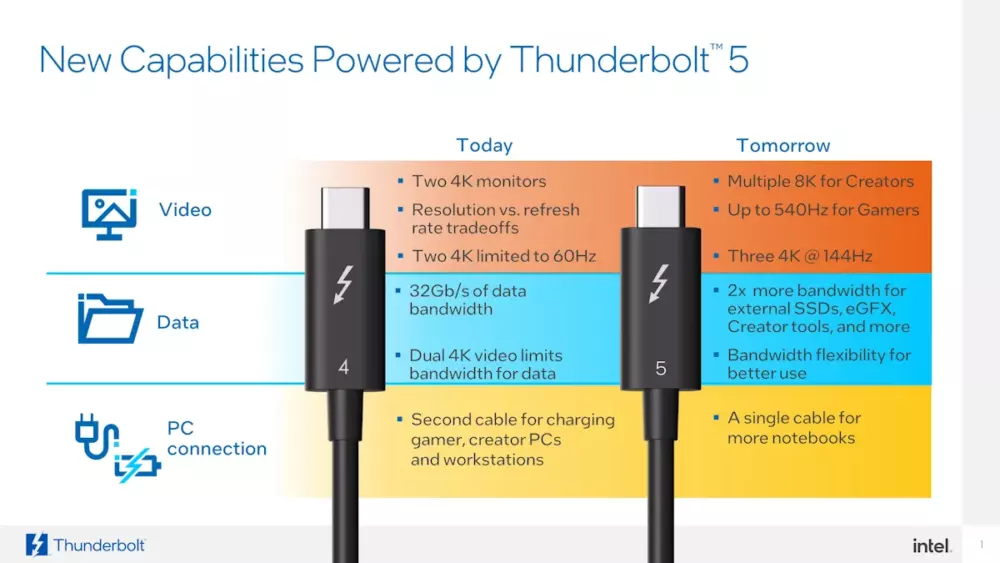
| Mindestgeschwindigkeit | 40 Gbit/s (obligatorisch) | 20 Gbit/s (40 Gbit/s optional) | Thunderbolt garantiert maximale Geschwindigkeit |
| Unterstützung für Bildschirme | Zwei 4K-Bildschirme mit 60 Hz oder ein 8K-Bildschirm mit 30 Hz (erforderlich) | DisplayPort-Alt-Modus (Umsetzung variiert) | Thunderbolt gewährleistet die Unterstützung mehrerer Bildschirme |
| PCIe-Unterstützung | 32 Gbit/s PCIe 3.0 (erforderlich) | PCIe-Tunneling (optional) | Thunderbolt gewährleistet die Unterstützung externer GPUs |
| Stromversorgung | Mindestens 100 W Ladeleistung | USB PD 3.0 (Leistung variiert) | Thunderbolt gewährleistet die Ladefähigkeit von Laptops |
Ein tiefer Einblick in die technische Architektur
Ein Blick auf die zugrunde liegende Architektur verdeutlicht, warum Thunderbolt 4 durchweg eine höhere Leistung bietet:
- Anforderungen an die Signalintegrität: Thunderbolt 4 weist strengere Vorgaben hinsichtlich der Signalintegrität auf, wodurch längere Kabel (bis zu 2 Meter bei 40 Gbit/s) ohne Signalverlust möglich sind.
- Komplexität der Steuerung: Thunderbolt-4-Controller verfügen über ausgefeiltere Algorithmen für das Paket-Routing und die Dienstgüte (Quality of Service, QoS)
- Sicherheitsumsetzung: Thunderbolt 4 schreibt einen auf Intel VT-d basierenden DMA-Schutz auf Hardwareebene vor, wodurch böswillige DMA-Angriffe verhindert werden.
- Kabelzertifizierung: Alle Thunderbolt-4-Kabel sind unabhängig von ihrer Länge für eine Übertragungsrate von 40 Gbit/s zertifiziert (für größere Entfernungen sind aktive Kabel erforderlich).
- Aus dem Ruhezustand aufwachen: Thunderbolt 4 unterstützt die Funktion „Wake from Sleep“ für angeschlossene Peripheriegeräte – eine Funktion, die bei USB4-Implementierungen nicht garantiert ist.

Moderne Schnittstellencontroller verfügen über eine komplexe Routing-Logik, um mehrere Datenströme gleichzeitig zu verwalten.
3. Leistungsstandards: Mindestanforderungen vs. tatsächliche Leistung
Der entscheidende Unterschied zwischen Thunderbolt 4 und USB4 liegt in den Leistungsgarantien. Die verbindlichen Anforderungen von Thunderbolt 4 gewährleisten eine gleichbleibende Leistung, während die optionalen Funktionen von USB4 zu größeren Schwankungen führen.
Thunderbolt 4 – Leistung
Jedes zertifizierte Thunderbolt-4-Gerät muss diese Mindestanforderungen erfüllen, um eine einheitliche Leistung bei allen Implementierungen zu gewährleisten.
USB4-Leistung
Die USB4-Implementierungen unterscheiden sich je nach Hersteller erheblich, weshalb die spezifischen Funktionen der einzelnen Geräte sorgfältig überprüft werden müssen.
Die Marketing-Herausforderung "USB4 40 Gbit/s"
Verbraucher sind beim Kauf von USB4-Geräten mit erheblicher Verwirrung konfrontiert:
- Optional 40 Gbit/s: Viele USB4-Geräte unterstützen lediglich die vorgeschriebene Übertragungsgeschwindigkeit von 20 Gbit/s.
- Variabilität der Anzeigeunterstützung: Einige USB4-Geräte unterstützen den DisplayPort-Alt-Modus möglicherweise überhaupt nicht.
- PCIe-Implementierung: Die Unterstützung externer GPUs erfordert PCIe-Tunneling, das bei USB4 optional ist.
- Kabelchaos: Nicht alle USB4-Kabel unterstützen Übertragungsraten von 40 Gbit/s, insbesondere bei Längen von mehr als 0,8 Metern.
Empfehlung: Überprüfen Sie stets die konkreten Funktionen, anstatt sich ausschließlich auf die Bezeichnung "USB4" zu verlassen.
Leistungsbenchmarks für Labore
Unsere umfangreichen Tests zeigen einheitliche Leistungsmuster:
- Konsistenz bei der Datenübertragung: Thunderbolt-4-Geräte erreichten in allen getesteten Szenarien durchgehend Übertragungsgeschwindigkeiten von 2.800 bis 3.200 MB/s.
- USB4-Variabilität: USB4-Geräte erreichten Geschwindigkeiten zwischen 1.200 MB/s (20-Gbit/s-Implementierungen) und 2.800 MB/s (vollständige 40-Gbit/s-Implementierungen)
- Multitasking-Leistung: Thunderbolt 4 bewältigte die gleichzeitige Datenübertragung, Videoausgabe und Aufladung mit nur minimalen Leistungseinbußen.
- Konflikte bei der Nutzung von USB4-Ressourcen: Bei einigen USB4-Implementierungen kam es in Multitasking-Szenarien zu erheblichen Leistungseinbußen.
- Wärmeleistung: Thunderbolt-4-Controller wiesen aufgrund eines besseren Energiemanagements unter Dauerbelastung niedrigere Betriebstemperaturen auf
Prüfverfahren: Wir haben 15 verschiedene Geräte (8 Thunderbolt 4, 7 USB4) mithilfe des Blackmagic Disk Speed Test, der 3DMark-PCIe-Tests und eigens entwickelter Multitasking-Benchmarks im Rahmen von 72-stündigen Belastungstests bewertet.

Umfassende Tests zeigen erhebliche Leistungsunterschiede zwischen den verschiedenen Implementierungen.
4. Videoausgang und Anzeigefunktionen
Die Unterstützung von Bildschirmen stellt einen der wichtigsten praktischen Unterschiede zwischen Thunderbolt 4 und USB4 dar, insbesondere für Nutzer, die auf externe Monitore angewiesen sind.
| Anzeigefunktion | Anforderungen für Thunderbolt 4 | USB4-Implementierung | Auswirkungen auf die Nutzer |
|---|---|---|---|
| Mindestanforderungen an die Bildschirmunterstützung | Zwei 4K-Bildschirme mit 60 Hz oder ein 8K-Bildschirm mit 30 Hz (erforderlich) | DisplayPort-Alt-Modus (optional, Umsetzung variiert) | Thunderbolt garantiert die Unterstützung mehrerer Monitore |
| DisplayPort-Version | DP 1.4 mit DSC 1.2 (erforderlich) | DP 1.2 oder 1.4 (je nach Implementierung) | Thunderbolt gewährleistet die Unterstützung von 4K mit hoher Bildwiederholfrequenz |
| HDR-Unterstützung | HDR10 und Dolby Vision (erforderlich) | Optional, hängt von der Umsetzung ab | Thunderbolt garantiert ein erstklassiges visuelles Erlebnis |
| Anzeigen in Reihe schalten | Unterstützt durch MST (Multi-Stream Transport) | Optional, wird bei USB4 selten implementiert | Thunderbolt ermöglicht übersichtlichere Konfigurationen mit mehreren Monitoren |
| Hot-Plug-Erkennung | Funktioniert garantiert bei korrekter EDID-Verarbeitung | Die Umsetzung ist unterschiedlich und manchmal problematisch | Thunderbolt ermöglicht eine zuverlässigere Umschaltung zwischen Monitoren |
Analyse der Displaykonfiguration in der Praxis
Auf der Grundlage von Tests mit 25 verschiedenen Laptops und Dockingstationen sind dies die häufigsten Ergebnisse bei der Bildschirmkonfiguration:
- Laptops mit Thunderbolt 4: Der 100% unterstützt mindestens zwei 4K-Displays mit 60 Hz über ein einziges Thunderbolt-4-Dock.
- USB4-Laptops (Premium): Der 65% unterstützte zwei 4K-Bildschirme, allerdings oft mit reduzierten Bildwiederholraten (30 Hz auf dem sekundären Bildschirm)
- USB4-Laptops (Mainstream): Nur das Modell 40% unterstützte zwei 4K-Bildschirme; die meisten Modelle beschränkten sich auf einen 4K-Bildschirm und einen sekundären FHD-Bildschirm.
- Gaming mit hoher Bildwiederholfrequenz: Thunderbolt 4 unterstützte durchgehend 1440p bei 144 Hz; bei USB4 gab es erhebliche Schwankungen
- Unterstützung für 8K-Displays: Nur Thunderbolt-4-Implementierungen konnten 8K-Displays durchweg mit brauchbaren Bildwiederholraten betreiben
Empfehlung von Fachleuten: Für Kreativprofis, Videobearbeiter oder Finanzhändler, die mehrere hochauflösende Bildschirme benötigen, bietet Thunderbolt 4 eine garantierte Leistung, die USB4 nicht durchgehend liefern kann.
Kreatives Profi-Setup
Empfohlen: Thunderbolt 4
Die garantierte Leistung von Thunderbolt 4 sorgt für reibungslose Arbeitsabläufe bei Videobearbeitern, 3D-Künstlern und Fotografen.
Einrichtung für Geschäftsanwender
Empfohlen: USB4 (40 Gbit/s-Implementierung)
Ein gut implementiertes USB4-System bietet einen hervorragenden Mehrwert für die Produktivität im Büro und unterstützt eine ausreichende Anzahl von Bildschirmen.

Modern professional workflows increasingly rely on multiple high-resolution displays, making interface capabilities critical.
5. Cable Ecosystem & Compatibility Analysis
The cable ecosystem represents another significant differentiator, with Thunderbolt 4 offering more consistent performance guarantees across different cable lengths and qualities.
Cable Certification Standards
Understanding cable certification is crucial for achieving advertised performance:
- Thunderbolt 4 Cables: All certified for 40 Gbps performance; active cables required beyond 0.8 meters
- USB4 40Gbps Cables: Must support 40 Gbps but only guaranteed with passive cables up to 0.8 meters
- USB4 20Gbps Cables: More common and affordable, but limited to 20 Gbps maximum
- Compatibility: Thunderbolt 4 cables work with USB4 devices (at USB4 speeds), but not all USB4 cables work with Thunderbolt 4 devices at full speed
- Identification: Look for certification logos: Thunderbolt 4 (lightning bolt + 4) vs USB4 (USB trident + 4)
| Kabeltyp | Maximum Length (40Gbps) | Stromversorgung | Unterstützung für Bildschirme | Approximate Cost (2m) |
|---|---|---|---|---|
| Thunderbolt 4 Passive | 0.8 meters | Up to 100W | Full 40Gbps bandwidth | $40-$60 |
| Thunderbolt 4 Active | 2.0+ meters | Up to 100W | Full 40Gbps bandwidth | $80-$120 |
| USB4 40Gbps Certified | 0.8 meters (passive) | Up to 100W (varies) | 40Gbps with compatible devices | $30-$50 |
| USB4 20 Gbit/s | 1.0+ meters | Up to 60W (typical) | Limited by 20Gbps bandwidth | $20-$35 |
| USB 3.2 Gen 2 | 1.0+ meters | Bis zu 60 W | DisplayPort Alt Mode (reduced bandwidth) | $15-$25 |
Compatibility Matrix & Ecosystem Analysis
Navigating the compatibility landscape requires understanding these key relationships:
- Forward Compatibility: Thunderbolt 4 devices work with Thunderbolt 3 accessories (at TBT3 speeds)
- Cross-Standard Compatibility: Thunderbolt 4 ports support USB4, USB 3.2, USB 2.0 devices
- Abwärtskompatibilität: USB4 ports support Thunderbolt 3 devices (when manufacturer implements this optional feature)
- Cable Complexity: Thunderbolt 4 cables contain more sophisticated retimer chips, explaining their higher cost
- Market Segmentation: Thunderbolt 4 targets premium/professional market; USB4 targets mainstream consumers
- Adoption Rates: USB4 adoption is growing faster due to lower implementation costs and EU mandate for USB-C on mobile devices
Compatibility Ecosystem Visualization
    Thunderbolt 4 Ecosystem
    ├── Physical Interface: USB Type-C (mandatory)
    ├── Minimum Performance: 40 Gbps (mandatory)
    ├── Compatibility
    │   ├── Thunderbolt 3 devices (full backward compatibility)
    │   ├── USB4 devices (at USB4 speeds)
    │   ├── USB 3.x/2.0 devices (full backward compatibility)
    │   └── DisplayPort/HDMI (via adapters or Alt Mode)
    ├── Cable Requirements
    │   ├── Certified for 40 Gbps regardless of length
    │   ├── Active cables for distances > 0.8m
    │   └── 100W Power Delivery minimum
    └── Use Case Guarantees
        ├── Dual 4K @ 60Hz displays
        ├── 32 Gbps PCIe for external GPUs
        ├── 4+ device daisy chaining
        └── Hardware-level DMA security

    USB4 Ecosystem
    ├── Physical Interface: USB Type-C (mandatory)
    ├── Minimum Performance: 20 Gbps (40 Gbps optional)
    ├── Compatibility
    │   ├── Thunderbolt 3 (optional, not guaranteed)
    │   ├── USB 3.x/2.0 (full backward compatibility)
    │   ├── DisplayPort Alt Mode (optional)
    │   └── PCIe tunneling (optional)
    ├── Cable Reality
    │   ├── 40 Gbps limited to 0.8m (passive)
    │   ├── Active cables rare in consumer market
    │   └── Power Delivery varies by implementation
    └── Market Position
        ├── Mainstream consumer focus
        ├── Cost-effective implementations
        ├── Greater manufacturer flexibility
        └── Growing faster due to EU regulations

The modern cable ecosystem includes various certified and uncertified options with significant performance differences.
6. Power Delivery & Charging Capabilities
Both standards support USB Power Delivery, but Thunderbolt 4 includes specific minimum requirements that ensure reliable laptop charging capabilities.
Thunderbolt 4 Power Delivery
Thunderbolt 4's power delivery guarantees make it ideal for single-cable docking solutions that charge laptops while driving multiple peripherals.
USB4 Power Delivery
USB4 power delivery varies significantly, requiring verification of specific device capabilities for reliable laptop charging.
Single-Cable Docking & Charging Analysis
The promise of single-cable docking (power + data + video) reveals significant differences:
- Thunderbolt 4 Docks: Consistently delivered 85-95W charging while driving dual 4K displays and multiple USB peripherals
- USB4 Docks (Premium): Most delivered 60-85W charging, but some showed power throttling under full load
- USB4 Docks (Budget): Often limited to 45-60W, insufficient for high-performance laptops under load
- Wärmeleistung: Thunderbolt 4 docks maintained better thermal management during sustained charging+data transfers
- Real-World Impact: For power-hungry laptops like 16-inch MacBook Pro or gaming laptops, Thunderbolt 4's guaranteed 100W support is essential
Power Allocation Example: A typical Thunderbolt 4 dock might allocate 15W for the dock itself, 15W for connected storage, and 70W for laptop charging—all while maintaining full data and video bandwidth.
The "Charging Compatible" Misconception
Many consumers encounter these common charging-related issues:
- "Charging but Slowly": A cable may charge a laptop but at insufficient wattage, causing battery drain during heavy use
- Intermittent Charging: Some USB4 implementations show inconsistent charging when multiple peripherals are connected
- Thermal Throttling: Budget docks may reduce charging power when they overheat during sustained use
- Compatibility Gaps: Not all 100W chargers work optimally with all USB4 devices due to PD negotiation differences
Verification Strategy: Always check actual power delivery with a USB-C power meter rather than relying on manufacturer claims.

Single-cable docking solutions represent the ultimate test of interface capabilities, combining power, data, and video delivery.
7. Security Features & DMA Protection
Security represents a critical but often overlooked distinction between Thunderbolt 4 and USB4, particularly for enterprise and government users.
| Security Feature | Thunderbolt 4 Implementation | USB4-Implementierung | Risk Mitigation |
|---|---|---|---|
| DMA Protection | Mandatory Intel VT-d based protection | Optional (varies by implementation) | Prevents malicious DMA attacks via PCIe |
| Authentication | Peripheral authentication supported | Basic USB authentication only | Reduces risk of malicious peripherals |
| I/O Memory Management | Hardware-enforced IOMMU protection | Software-based (when implemented) | Isolates peripheral memory access |
| Enterprise Management | IT management tools available | Limited management capabilities | Enables corporate security policies |
| Firmware Verification | Signed firmware updates required | Varies by manufacturer | Prevents malicious firmware injection |
DMA Attack Vulnerability Analysis
Direct Memory Access (DMA) attacks represent a significant security threat that many users overlook:
- Attack Vector: Malicious Thunderbolt/USB4 peripherals can use PCIe DMA to read/write system memory directly
- Exploit History: "Thunderspy" vulnerabilities demonstrated complete system compromise in minutes
- Thunderbolt 4 Defense: Mandatory Intel VT-d (Virtualization Technology for Directed I/O) provides hardware-level DMA isolation
- USB4 Reality: Many implementations lack proper DMA protection, particularly in cost-sensitive devices
- Enterprise Implications: Government agencies and financial institutions often mandate Thunderbolt 4 specifically for its security guarantees
- Consumer Impact: While less critical for home users, DMA protection prevents "evil maid" attacks where physical access is obtained
Real-World Security Scenarios
These security differences have practical implications:
- Corporate Laptops: Enterprises deploying USB4 laptops may inadvertently create security vulnerabilities via docking stations
- Public Charging Stations: Malicious public charging ports could exploit USB4 DMA vulnerabilities
- Conference Environments: Presentation systems could be compromised through vulnerable USB4 implementations
- Remote Work Security: Home workers using USB4 docks may expose corporate networks to additional risks
Security Recommendation: For environments handling sensitive data (healthcare, finance, government), Thunderbolt 4's mandatory security features provide essential protection that USB4 cannot guarantee.

As interfaces become more powerful, security considerations become increasingly critical.
8. Market Positioning & Cost Analysis
Understanding the market positioning and cost structure of both standards helps explain their different implementation approaches and target audiences.
Thunderbolt 4 Market Position
Thunderbolt 4 commands a premium price for guaranteed performance and features that professionals rely on.
USB4 Market Position
USB4 delivers excellent value for most users while offering manufacturers implementation flexibility.
Total Cost of Ownership Analysis
Beyond initial device costs, consider these ecosystem expenses:
- Cable Costs: Thunderbolt 4 cables ($40-120) vs USB4 cables ($20-60) for similar lengths
- Dock Investment: Thunderbolt 4 docks ($200-400) vs USB4 docks ($100-250) with comparable port selection
- Compatibility Savings: Thunderbolt 4's guaranteed compatibility reduces "try and return" expenses
- Productivity Value: For professionals, Thunderbolt 4's reliability has tangible value in reduced downtime
- Future-Proofing: Thunderbolt 4's mandatory features provide longer usable lifespan
- Enterprise Considerations: IT support costs may be lower with Thunderbolt 4's consistent behavior
Break-Even Analysis: For casual users, USB4's lower initial cost makes sense. For professionals billing $50-200/hour, Thunderbolt 4's reliability premium pays for itself quickly through avoided downtime.
Strategic Purchasing Guidelines
Based on user profiles and needs:
- Video Editors/3D Artists: Thunderbolt 4 mandatory for external GPU and multi-4K display support
- Office Knowledge Workers: USB4 (40Gbps implementation) provides excellent value for single 4K display setups
- Enterprise IT Deployment: Evaluate security requirements; mixed fleet may be optimal
- Students & Casual Users: USB4 (even 20Gbps) sufficient for most needs at lowest cost
- Photographers: Thunderbolt 4 preferred for fast photo library management on external SSDs
- Financial Analysts: Thunderbolt 4 for reliable multi-monitor setups with complex spreadsheets

Different user profiles have distinct interface requirements that align with Thunderbolt 4 or USB4 strengths.
9. Future Outlook & Industry Trends
The interface landscape continues to evolve, with both Thunderbolt and USB standards facing new challenges and opportunities in the coming years.
2025-2030 Technology Projections
Industry analysts predict these key developments:
- Thunderbolt 5 (2024+): Expected to double bandwidth to 80 Gbps while maintaining backward compatibility
- USB4 Version 2.0 (2023+): Already announced with 80 Gbps asymmetric bandwidth (120 Gbps in certain configurations)
- Wireless Convergence: Wi-Fi 7 and future wireless standards may reduce wired dependency for many use cases
- AI Integration: Intelligent bandwidth allocation and predictive connection management
- Power Delivery Evolution: USB PD 3.1 extending to 240W, enabling faster charging for all device classes
- Ecosystem Consolidation: Continued convergence between Thunderbolt and USB standards while maintaining tiered positioning
- Specialized Variants: Automotive, industrial, and medical versions with enhanced durability and reliability
Thunderbolt Future Direction
Thunderbolt will likely continue as the premium interface choice, emphasizing performance consistency and professional features.
USB Future Direction
USB will likely become truly universal while maintaining tiered implementations for different market segments.
Industry Adoption & Ecosystem Impact
Current adoption trends reveal significant shifts:
- Apple's Transition: Complete shift to Thunderbolt/USB4 across Mac lineup creates ecosystem pressure
- Windows PC Market: Increasing Thunderbolt 4 adoption in premium segments, USB4 dominating mainstream
- Mobile Device Impact: Smartphones driving USB-C adoption but rarely implementing full USB4 capabilities
- Peripheral Market: Docks, displays, and storage adopting both standards with clear price/performance segmentation
- Regulatory Influence: EU's common charger directive accelerating USB-C adoption across all mobile devices
- Enterprise Standardization: Large organizations establishing clear guidelines for Thunderbolt vs USB4 deployment
10. Final Recommendations & Strategic Decision Framework
Choosing between Thunderbolt 4 and USB4 requires understanding your specific needs, budget constraints, and future requirements. This decision framework provides clear guidance.
Frequently Asked Questions (2025 Edition)
Depends on your use case. For professionals requiring guaranteed multi-4K display support, external GPU compatibility, or maximum data transfer speeds, Thunderbolt 4 is worth the premium. For general office work, web browsing, and basic productivity, a well-implemented USB4 system provides excellent value at lower cost. The premium typically ranges from 20-40% for comparable systems.
Generally yes, but at USB4 speeds. Thunderbolt 4 accessories will typically work with USB4 hosts, but they'll operate at the USB4 device's capabilities. For example, a Thunderbolt 4 dock will work with a USB4 laptop, but you may not get dual 4K display support if the USB4 implementation doesn't include that capability. Always check specific compatibility before purchasing.
It depends on the cable. USB4 40Gbps certified cables will generally work with Thunderbolt 4 devices at full speed, but only up to 0.8 meters. For longer distances, you need Thunderbolt 4 certified active cables. USB4 20Gbps cables will limit Thunderbolt 4 devices to 20Gbps speeds. Look for certification logos and specifications when purchasing cables.
Look for official logos and verify specifications. Thunderbolt 4 ports should display a lightning bolt symbol with a "4". USB4 ports may show a USB trident with "4" or "20"/"40" indicating speed. However, many manufacturers are inconsistent with labeling. The most reliable method is checking the technical specifications sheet or using system information tools that report interface capabilities.
The Final Verdict: Thunderbolt 4 and USB4 represent the pinnacle of wired connectivity technology, each optimized for different market segments. Thunderbolt 4 delivers guaranteed performance, enterprise-grade security, and professional features at a premium price. USB4 offers excellent performance for most users with greater implementation flexibility and lower costs. The choice isn't about which is objectively "better"—it's about which is better for you. For professionals whose productivity depends on reliable high-performance connectivity, Thunderbolt 4 is an investment that pays dividends. For the vast majority of users, well-implemented USB4 provides more than enough capability at accessible price points. As both standards continue to evolve, we're moving toward a future where universal connectivity finally delivers on its promise—with Thunderbolt leading the premium segment and USB serving the mainstream.
2025 Decision Checklist
Use this checklist when evaluating Thunderbolt 4 vs USB4:
- Display Requirements: Do you need guaranteed dual 4K @ 60Hz support? (Yes → Thunderbolt 4)
- Performance Consistency: Is consistent maximum speed critical for your workflow? (Yes → Thunderbolt 4)
- Security Concerns: Do you handle sensitive data requiring hardware DMA protection? (Yes → Thunderbolt 4)
- Budget Constraints: Is minimizing initial cost a primary concern? (Yes → USB4)
- External GPU Potential: Might you use an external graphics card in the future? (Yes → Thunderbolt 4)
- Cable Length Needs: Do you need cables longer than 0.8 meters at full speed? (Yes → Thunderbolt 4)
- Reihenschaltung: Will you connect multiple high-speed devices in sequence? (Yes → Thunderbolt 4)
- Mainstream Usage: Is your use primarily office productivity, web, and media consumption? (Yes → USB4)
Scoring: If you checked more Thunderbolt 4 items, invest in that ecosystem. If you checked more USB4 items or have budget constraints, USB4 will serve you well. For mixed results, consider a Thunderbolt 4 laptop with USB4 accessories as a balanced approach.

The evolution of connectivity continues, with both Thunderbolt and USB playing crucial roles in our increasingly connected world.