


Universal Serial Bus (USB) technology has evolved from a simple peripheral connection standard into the backbone of modern digital ecosystems. As we move further into 2025, understanding USB's capabilities, specifications, and future direction is essential for both consumers and procurement professionals. This comprehensive guide breaks down USB technology into three critical layers: foundational knowledge, practical procurement guidance, and future trends.
Layer 1: Foundational Understanding — Deciphering USB's "Language"
Knowledge Point 1: USB Interface Types — More Than Just Shapes
1.1 USB-A (Standard-A): The Declining Workhorse
Once the undisputed standard for host connections, USB-A is gradually being phased out in modern ecosystems. Its fundamental limitation lies in its unidirectional insertion design—requiring specific orientation that often leads to the infamous "three-flip syndrome." While still prevalent on many desktop computers, power strips, and legacy peripherals, USB-A faces increasing marginalization as mobile devices and modern laptops standardize on more advanced interfaces.
The decline of USB-A represents a broader industry shift toward universal compatibility. New smartphones haven't shipped with USB-A ports for years, and the latest laptops increasingly offer USB-C-exclusive configurations. For procurement professionals, this signals a clear directive: prioritize devices with USB-C connectivity unless specific legacy compatibility requirements dictate otherwise.
1.2 USB-C: The Universal Future
USB-C represents not merely an incremental improvement but a revolutionary redesign of the connection standard. Its adoption across devices from smartphones to high-performance workstations stems from four transformative advantages:
Reversible Insertion
Eliminates orientation frustration with symmetrical 24-pin design
Multi-Protocol Support
Carries USB, DisplayPort, Thunderbolt, HDMI, and more over single cable
High-Power Delivery
Supports up to 240W with USB PD 3.1—enough for powerful workstations
Ultra-High Speed Data
Up to 80 Gbps with USB4 v2.0, rivaling internal connection speeds
For procurement, the mandate is unequivocal: any new device acquisition should prioritize USB-C connectivity, with careful attention to the specific protocols supported (more on this in Knowledge Point 2). The European Union's legislation mandating USB-C for portable devices by 2024 has accelerated this transition globally.
1.3 Legacy Interfaces (Micro-USB, Mini-USB): Niche Persistence
These connectors maintain relevance primarily in specific niches:
- Micro-USB: Still found in some budget Bluetooth accessories, older power banks, and IoT devices where cost minimization overrides future-proofing considerations.
- Mini-USB: Largely obsolete, occasionally appearing in specialized industrial equipment or discontinued product lines.
Procurement professionals should note that demand for accessories supporting these legacy standards will continue to diminish annually. Stocking decisions should reflect this downward trajectory unless explicit maintenance requirements for aging equipment exist.
Knowledge Point 2: USB Versions & Protocols — The DNA of Speed and Function
2.1 Speed Generations Comparison
(formerly USB 3.0)

2.2 Protocol Coexistence: The Critical Distinction
A crucial concept for procurement professionals is that physical interface does not guarantee protocol support. A USB-C connector might house only USB 2.0 electronics (common in inexpensive charging cables) or support the full USB4/Thunderbolt protocol suite.
Critical Procurement Insight
Never assume capabilities based solely on connector type. A USB-C cable purchased for $5 will almost certainly not support 40 Gbps data transfer or 8K video output, regardless of the physical connector matching high-end specifications.
2.3 Certification Markings Decoded
Official certification logos serve as the primary indicator of quality and capability validation:
USB-IF Certification
The USB Implementers Forum's "Trident" logo indicates compliance testing for safety, interoperability, and performance. Products bearing this logo have passed rigorous testing protocols.
Thunderbolt Certification
The lightning bolt icon (often with a numeral) guarantees full Thunderbolt compatibility, including the highest data rates, video protocols, and daisy-chaining capabilities.
Procurement Rule: Certification marks represent the baseline quality threshold. For business or professional use, uncertified cables and accessories should be avoided due to risks of device damage, data loss, and inconsistent performance.
Layer 2: Procurement Selection — The Practical Buyer's Guide
Knowledge Point 3: Functional Classification — Three Cable Categories
3.1 Charging-Only Cables
These cables prioritize power delivery over data capabilities. The critical specifications are:
2025 Procurement Guidance: The USB Power Delivery 3.1 standard supporting up to 240W is becoming the expected norm for high-power laptops, workstations, and professional equipment. Always verify that charging cables include E-Marker chips that accurately communicate their capabilities to connected devices.
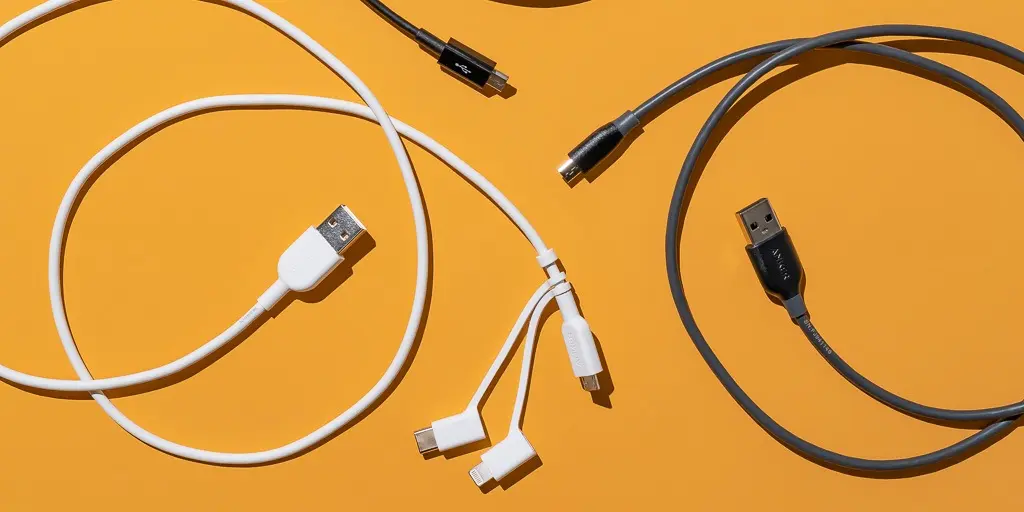
3.2 Data + Charging Cables
These hybrid cables serve most general computing needs, combining reasonable data transfer with power delivery. Essential verification points include:
- Explicit speed ratings: "USB 3.2 Gen 2" (10 Gbps) or "USB4" (20/40 Gbps)
- Power Delivery specifications: Minimum 60W for laptop charging, 100W+ for high-performance models
- Cable length vs. capability: Longer cables may reduce maximum power delivery or data rates
Procurement Red Flag
Avoid any USB-C cable marketed without explicit data speed specifications. These are almost certainly limited to USB 2.0 (480 Mbps) speeds, regardless of their premium appearance or packaging claims.
3.3 Full-Feature Cables (Video/Data/Charging)
These represent the pinnacle of USB-C implementation, integrating multiple functions through Alternate Mode protocols. Key considerations:
Procurement Verification Checklist:
- Maximum supported resolution (e.g., 4K@120Hz, 8K@60Hz)
- Refresh rate capabilities for gaming or professional video applications
- Simultaneous data transfer while driving displays
- Daisy-chaining support for multiple monitors
Layer 3: 2025 Trends — Targeting Next-Generation Requirements
Knowledge Point 5: Performance Frontiers — USB4 v2.0 & The 80Gbps Era
5.1 Speed Breakthroughs
USB4 Version 2.0, ratified in late 2022 and now entering mainstream adoption in 2025, represents the most significant performance leap since the original USB4 specification:

Professional Applications: These speeds transform workflows for:
- Real-time editing of 8K RAW video footage directly from external storage
- Instantaneous backup of multi-terabyte databases
- High-performance external GPU enclosures approaching internal PCIe performance
- Multi-gigabit network connectivity through USB-C adapters
5.2 Relationship with Thunderbolt 5
Intel's Thunderbolt 5 specification builds upon the USB4 v2.0 foundation while adding guaranteed performance levels and extended capabilities:
For procurement: Thunderbolt 5 ensures a premium, guaranteed experience while USB4 v2.0 offers broader compatibility at potentially lower costs. The choice depends on specific use-case requirements and budget constraints.
5.3 New Encoding Technology: PAM3
The speed breakthroughs in USB4 v2.0 are enabled primarily by a shift from traditional Non-Return-to-Zero (NRZ) encoding to Pulse Amplitude Modulation with 3 levels (PAM3).
Why PAM3 Matters
PAM3 transmits 1.5 bits per symbol instead of 1 bit per symbol with NRZ, achieving 50% more data within the same frequency constraints. This allows 80 Gbps speeds without requiring impractically high frequencies that would increase power consumption and electromagnetic interference.
Procurement Implication: Cables and devices supporting these new speeds will carry premium pricing through 2025-2026 as the technology matures. Early adoption is recommended only for workflows that genuinely benefit from the performance uplift.
Strategic Procurement Recommendations for 2025
As USB technology continues its rapid evolution, informed procurement decisions become increasingly critical. By understanding the technical foundations, practical implementation considerations, and emerging trends outlined in this guide, organizations can optimize their technology investments while ensuring compatibility, performance, and future readiness.