

What Is the Difference Between a USB Charging Cable and a Data Cable?
What Is the Difference Between a USB Charging Cable and a Data Cable?
You plug one USB cable from a wall charger into your phone — and it charges. You plug a different cable into the same phone, this time connected to your laptop — and now you can drag photos across, too. Same plug on one end, same phone, completely different behavior. Why? The answer is simple: not all USB cables are built the same. Some are engineered to carry power only, while others are built to carry power plus data. In this guide we break down exactly how they differ inside the jacket, how to tell them apart on your desk, and which one you should actually be buying.
1. What Is a USB Data Cable?
A USB data cable is the standard cable you get in the box with most smartphones, tablets, power banks and cameras. Its job is to do two things at once:
- Deliver power from the charger to the device (charging).
- Carry data back and forth between the device and a host such as a PC, Mac, car stereo or smart TV.
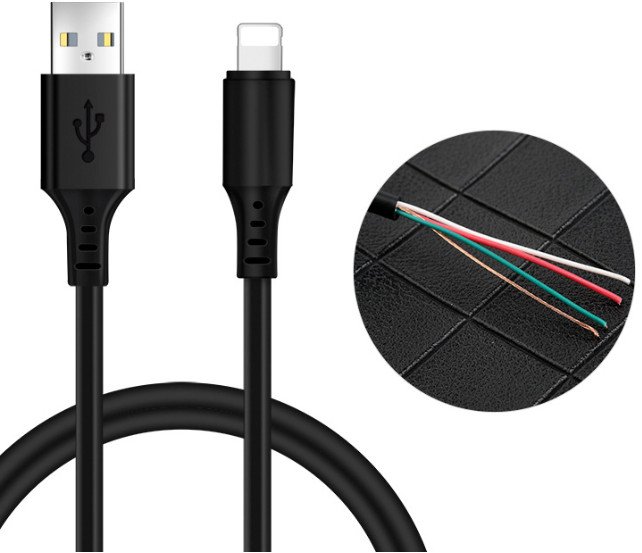
Inside a USB 2.0 data cable there are four wires, plus shielding:
| Wire color | Pin name | Toiminto |
|---|---|---|
| Red | VBUS (+5 V) | Power line; a standard USB 2.0 port delivers up to 500 mA, higher with charging profiles |
| Black | GND | Ground return for the power line |
| White | D− | Data negative (half of the differential USB 2.0 signal pair) |
| Green | D+ | Data positive (the other half of the differential pair) |

The red and black wires are the power pair. The white and green wires are the data pair. Because all four conductors are present, the host computer can "see" the device and negotiate a data connection — file transfer, MTP sync, ADB debugging, tethering, firmware updates, and so on.
2. What Is a USB Charging-Only Cable?
A USB charging cable (often called a charge-only cable) is built for one purpose only: to deliver power. It has no data lines.
Inside, you typically find only two wires:
| Wire color | Pin name | Toiminto |
|---|---|---|
| Red (sometimes white in non-standard builds) | VBUS (+5 V, or higher for fast-charge) | Power line only |
| Black | GND | Ground return only |

There is no D+ and no D−. As a result:
- The phone or tablet will charge normally.
- The computer will never detect the device as a storage drive or MTP device.
- No photos, files, music or firmware can move through the cable.
Because there are only two conductors, charge-only cables are usually thinner and lighter than data cables of the same length, since there is no need to shield a differential data pair.
3. Side-by-Side Comparison
| USB Charging Cable | USB Data Cable | |
|---|---|---|
| Primary purpose | Charging only | Lataaminen ja data transfer |
| Internal wires | 2 (VBUS + GND) | 4 (USB 2.0) or more (USB 3.x / USB-C) |
| Typical thickness | Thinner jacket | Thicker jacket |
| Connects phone to PC? | Ei | Kyllä |
| File transfer / MTP / ADB | Ei tueta | Tuettu |
| Fast charging | Yes (up to the cable gauge) | Kyllä |
| Price | Cheaper | Slightly more expensive |
| Availability in retail | Less common as a standalone SKU | The default cable in most device boxes |
| Common use | Public chargers, kiosks, secure areas, cheap replacement cables | Daily phone/tablet use, syncing, car play, firmware upgrades |
| Security risk | Lower (no data can leak through the port) | Higher (BadUSB / Juice-Jacking possible on untrusted hosts) |
4. How to Tell Which Cable You Have
You don't have to cut the jacket open. There are three easy ways:
4.1 Method 1 — Plug it into a computer (the definitive test)
1. Connect one end to a Windows or Mac computer.
2. Connect the other end to your phone or tablet.
3. Open File Explorer (Windows) or Finder / Android File Transfer (Mac).

- If your phone appears as a portable device / MTP storage → it is a data cable.
- If the phone only charges and nothing shows up on the computer → it is a charging-only cable.
On Android, swipe down the notification shade. If you see a "USB for charging / File transfer / MIDI" prompt, the cable is a data cable. A pure charge-only cable will not show this prompt.
4.2 Method 2 — Look at the thickness and price
As a rough rule of thumb:
- Thin, limp cables that came free with a cheap power bank or public charger are very often charge-only.
- Thicker, stiffer cables that came in the box with a branded smartphone are almost always data cables.
This is not 100% reliable — some thin premium cables still have four wires — but it is a useful first filter.
4.3 Method 3 — Check the product listing or packaging
Reputable manufacturers will state "Supports data transfer up to 480 Mbps" or "USB 2.0 data + charging" on the listing or retail box. If the listing says "Charging cable" with no mention of data, treat it as charge-only.
5. When Would You Want a Charge-Only Cable?
Most people assume a data cable is always better, but there are real-world scenarios where a charge-only cable is the safer choice:
- Public charging stations and airport kiosks. A data cable plugged into a compromised port can expose your phone to "juice jacking" — data theft or malware. A charge-only cable physically removes that risk.
- Secure offices, government sites, factories and labs. IT departments often issue charge-only USB cables so visitors cannot copy data through USB ports.
- Shared kiosks, conference halls and hotel lobbies. Charge-only cables stop users from pairing personal phones with the kiosk host or copying data out through the port.
- Low-cost replacement packs. For customers who only need a spare cable for the car or office, a charge-only cable keeps the price point down.
6. Conclusion
The difference between a USB charging cable and a data cable comes down to what is inside the jacket:
- A data cable has four (or more) wires: two for power, two for data. It charges your phone ja lets you connect to a computer, transfer photos, update firmware and more.
- A charging cable has only two wires — power in, ground out. It charges perfectly, but no data will ever move through it.
For everyday use, choose a data cable. For public chargers, secure facilities and low-cost replacement packs, a charge-only cable is often the safer, cheaper option. When in doubt, plug it into a computer — that is the quickest way to know exactly which cable you are holding.